What Are People Searching for On Pinterest: A+ essentials

a variety of images all around school being in session 9-5 what are people searching for on pinterest by jen vazquez media template blog header image

What Are People Searching for On Pinterest: A+ essentials
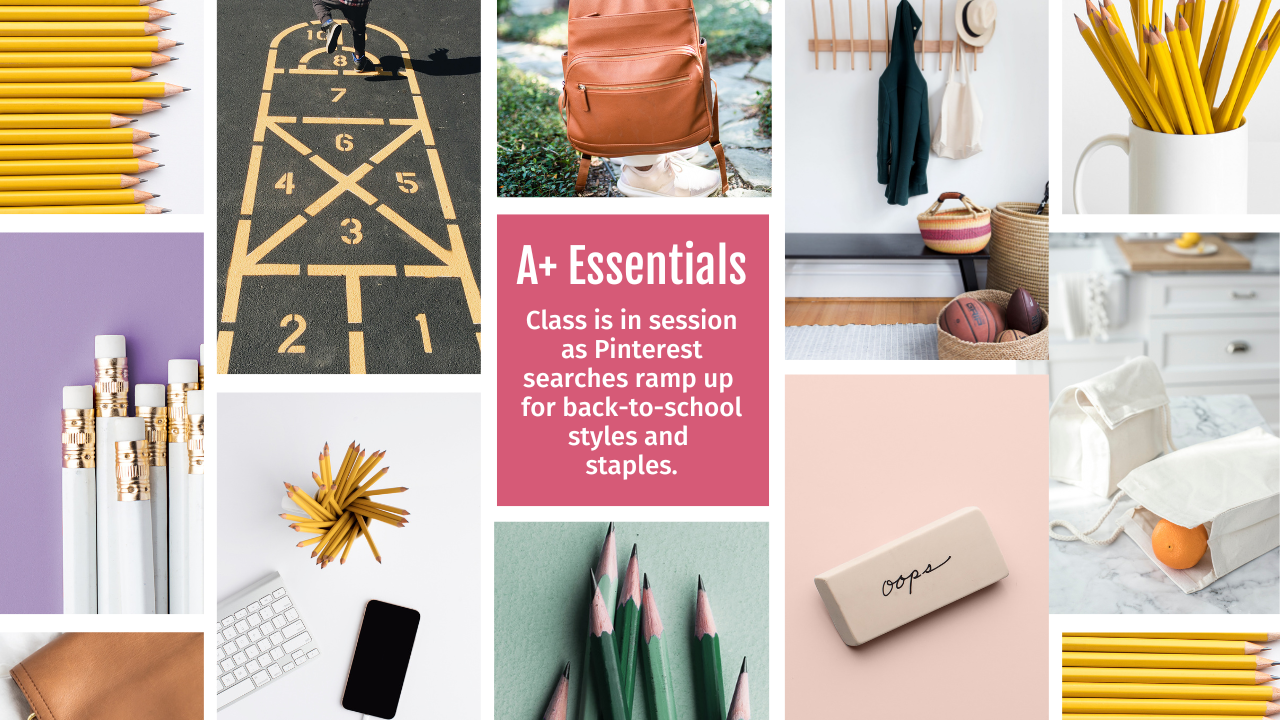
I’m back with the latest Pinterest trends and this week Pinterest collected insights around the theme: A+ essentials. People on Pinterest are getting ready for a new school year in creative and mindful ways 📚.

Key trends

  • 3x increase in “back to school photo booth

  • 2.5x increase in “emergency kit for school

  • 2.5x increase in “school clothes organization

  • 185% increase in “healthy school lunches

  • 115% increase in “college backpack essentials

Behind the trends

Pinterest is a place to look forward. In fact, more than 463 million* people use Pinterest to find tomorrow’s ideas. By observing current trends on Pinterest, we can glean valuable insights into what may trend elsewhere in the near future.

Each week, Pinterest Predicts Weekly highlights actionable search trends among Pinterest users across categories, regions, and demographic groups. All search queries link to trends.pinterest.com where you can discover insights and create campaigns around popular search queries.

 
Check out Pinterest’s report to see their report.

*Pinterest, Global analysis, Q1 2023.

Audience spotlight: Prepped for Pep!

Pinterest searches are on the rise for back-to-class planning and preparations. Growing searches by Gen Z in the last three weeks compared to the previous three weeks:

  • 2.5x increase in “emergency kit for school”
  • 2x increase in “back to school nails acrylic”
  • 115% increase in “college backpack essentials”
  • 70% increase in “pink school supplies”

FREE Pinterest Challenge

Sign up to learn how to work smarter not harder on Pinterest to grow your business.  You’ll learn:

—> Strategy, Workflow, and Analytics That Matter
—> What Type of Content Grows Your Business
—> What Pins Work Best To Grow Your Business (not just like you)
—> Strategy, Workflow, and Analytics (oh my) That Matter

Category Trend: Academic aesthetic

People on Pinterest are gearing up for a vibe-worthy learning mode.

Tech

In the last three weeks compared to the previous three weeks:

Fashion

In the last three weeks compared to the previous three weeks:

Health

In the last three weeks compared to the previous three weeks:

Growing Trend: Grading with gratitude

On Pinterest, people are finding ways to show appreciation for learning. Growing search terms in the last three weeks compared to the previous three weeks:

Other growing search terms in the last three weeks compared to the previous three weeks:

  • 3x increase in “first day of school gifts for teachers”
  • 3x increase in “back to school gifts for kids”
  • 2.5x increase in “back to school cookies”
  • 2x increase in “new teacher gift ideas”

Moment Spotlight: First Day of Class

From desk to decor, everyone’s creating their own school spirit.

  • 4x increase in “back to school bulletin boards preschool”
  • 2.5x increase in “school clothes organization”
  • 140% increase in “school nurse office decorations”
  • 130% increase in “teacher desk decorations”
  • 100% increase in “school planner”
  • 55% increase in “school backpack essentials”

Here is more information that may be helpful!

Don’t Forget to Pin It!

What Are People Searching For On Pinterest by Jen Vazquez Media

Supercharge Your Service Business on Pinterest: Must-Have Boards!

Must-Have Boards for Pinterest as a Service Provider! Pins for blog by Jen Vazquez Media Pinterest Manager and Pinterest Marketing Strategist

Must-Have Boards for Pinterest as a Service Provider!

Are you a service provider looking to boost your online presence and attract more clients? Pinterest has got your back! I know it can feel a bit overwhelming at first, but fear not, my friend. I’m here to help you navigate the exciting world of Pinterest boards. The burning question on your mind is probably, “What Pinterest boards should I have?” Well, let’s dive in and find out together!

Understanding Pinterest Boards

Picture this: Pinterest boards are like virtual treasure chests filled with ideas from all over the internet. You can save images, articles, and more from any website out there (unless the website owner puts up a “no pinning” sign, like a digital bouncer). There are three main types of Pinterest boards:

  1. Public boards: These boards are open for everyone to see. Show off your expertise and let your content shine!
  2. Secret boards: Need to keep things hush-hush? Secret boards are your go-to. Only you and your trusted contributors can access them. All your personal Pinterest pinning should be done on secret boards. You can still pin to these boards.
  3. Archived boards: For your eyes only! These boards are purely personal, perfect for gathering inspiration or saving private gems.  You can’t pin to them but they aren’t lost.

Why Pinterest Boards Matter for Service Providers

Using my proven Pinterest Marketing Method, I help hyper-busy, female service providers create one marketing workflow to book more clients and increase their income and impact… in about an hour a week

Now, here’s where the magic happens. Each time you add a pin to a board, it gets exposed to your followers and the followers of that specific board. Imagine that—targeted exposure without spending a dime! But hold your horses, we need to set up strong and relevant boards right from the start to make the most of this golden opportunity.

Must-Have Boards for Pinterest as a Service Provider! Pins for blog by Jen Vazquez Media Pinterest Manager and Pinterest Marketing Strategist

Step 1: Evaluate Your Service Categories

Let’s start by identifying the core categories of your service business. Think about the services you offer and the expertise you bring to the table. We’re talking broad categories here, so you can cast a wide net. For example, if you’re a social media consultant, your categories might include:

  1. Social Media Marketing
  2. Content Strategy
  3. Branding
  4. Digital Advertising
  5. Analytics

Feel free to jot down your categories on a digital spreadsheet or a good old-fashioned piece of paper.

Step 2: Crafting the Perfect Pinterest Boards

Now, let’s get creative and strategize our board setup. The key here is to maximize visibility and reach. Aim to save each pin to at least five relevant public boards. More boards mean more chances for your content to go viral!

For each category, you’ll want a minimum of five boards. Remember, you can have up to 500 boards on your Pinterest account, but we’ll start with the essentials. Don’t go overboard all at once—pace yourself like a Pinterest pro.

Step 3: Board Naming with a Dash of Keywords

Here’s where we sprinkle some Pinterest magic dust on our boards. We want them to be relevant and search engine-friendly. To choose the perfect board titles, let’s tap into what Pinterest users are searching for.

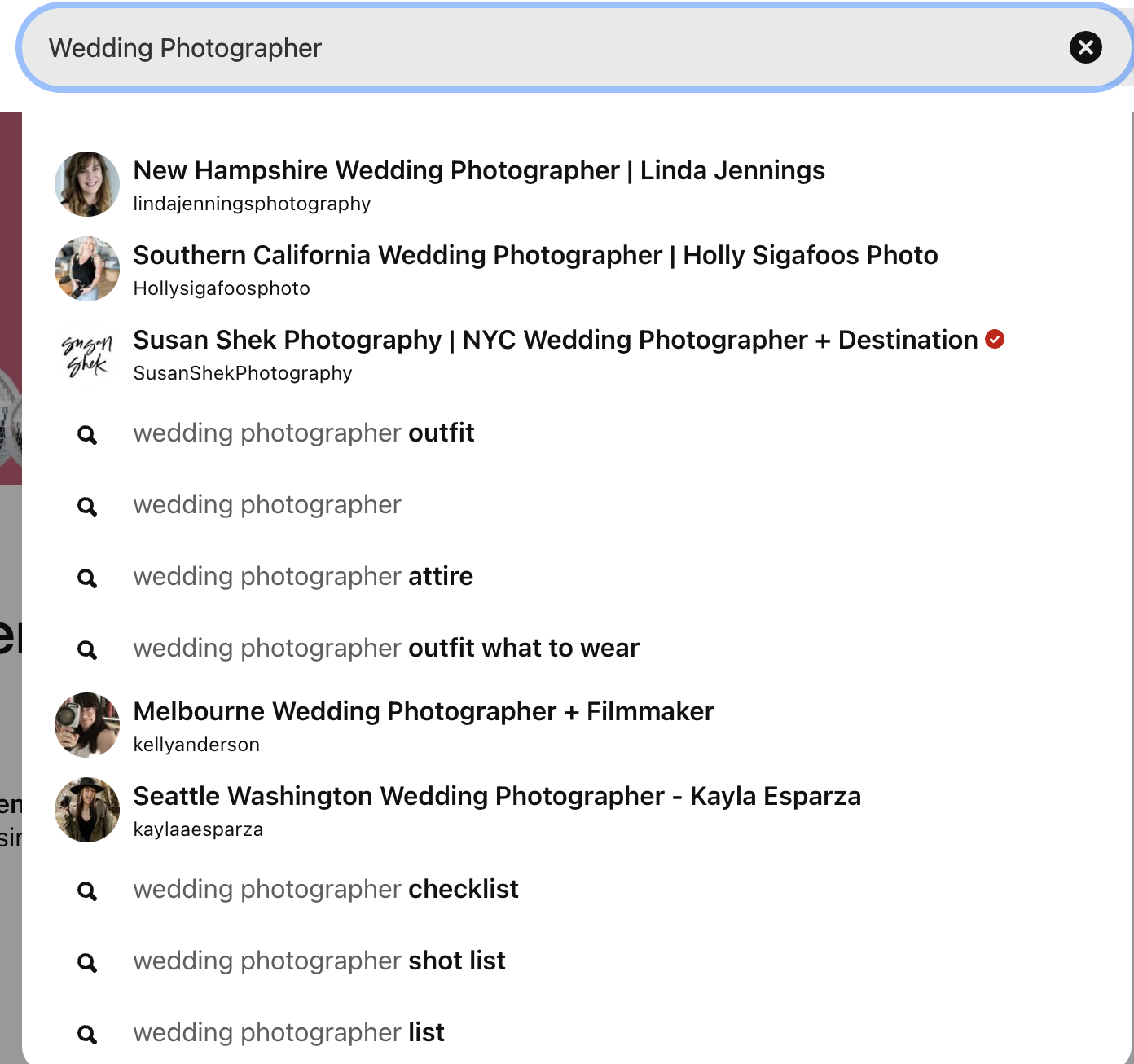
Start by typing your first category into the Pinterest search bar. You’ll see a dropdown list of popular keywords related to your category. These suggestions are pure gold! Select the ones that best align with your content. 

Remember, you can rearrange the keywords to make them sound natural while still being search-friendly. Let your creativity run wild!

Find ideas for boards by using your blog categories or business categories. Search on Pinterest and see the drop down menu for more keywords. by Jen Vazquez Media Pinterest Manager

Step 4: Optimize Your Boards with Pinterest SEO

Time to give your boards some SEO love! Add a board description using related keywords to boost.  This means that you have to go back into the boards you create to add a description.  Use as many keywords as you can while still making it “readable” by humans to win the SEO game!

Summary

Pinterest is a powerful tool that can supercharge your service business and help you attract more clients. By strategically creating and organizing your Pinterest boards, you can showcase your expertise, increase your online visibility, and reach a wider audience.

Remember to evaluate your service categories, craft relevant boards, and optimize them with keywords on a regular basis to enhance their searchability. With a little creativity and consistent effort, you can harness the potential of Pinterest to grow your service business and stand out in a competitive market.

So, don’t wait any longer—start creating those irresistible Pinterest boards and watch your business soar to new heights!

If you don’t think you’ll have the time but want the benefit of Pinterest, consider hiring a Pinterest manager to allow you to work in your zone of genius.  Find out more or schedule a free consultation below!

Here is more information that may be helpful!

Don’t Forget to Pin It!

Must-Have Boards for Pinterest as a Service Provider! Pins for blog by Jen Vazquez Media Pinterest Manager and Pinterest Marketing Strategist

Pinterest 101 in 2023: Keywords for Pinterest Marketing (Part 2)

PinterestMarketing 101-Keywords by Jen Vazquez Media

Pinterest 101 for 2023: Using Keywords

Welcome to Blog #2 of the Pinterest 101 Series. 

Welcome to the ultimate guide on finding and using keywords on Pinterest! It may be surprising that the first step is to find keywords, but keywords are the secret sauce for getting found on Pinterest and having Pinterest serve your information up to your ideal clients.

In this post, you’ll learn how to:

  • how to find your keywords using Pinterest
  • the different types of pins + how to find them
  • what keywords work well (+ don’t) on Pinterest
  • tips on how to optimize your pins for better results

What Are Keywords

Keywords are the words or phrases that your ideal audience types into the Pinterest search bar to find the content they’re interested in. By using relevant keywords in your pins, boards, and in your profile, you increase your chances of getting found by your target audience and getting more engagement on your content.

Try to Avoid:

  • An Instagram strategy for hashtags
  • Industry-specific keywords
  • Just single words
  • Keywords that aren’t about the content

Definitely DO the following:

  • Find keywords that are popular on Pinterest
  • Use keywords that solve your ideal client’s problem

Why do Keyword Research for Pinterest

Before we start going into details on your Pinterest keyword research process, you need to understand why Pinterest keywords are so important! So let’s start with…

Is Pinterest a social media platform?

It’s considered a social media platform in google analytics, but it’s actually a search platform (and a REALLY good search engine just like Youtube and Google). Search engines are designed to give users the best possible search results based on their query.

As a user of Pinterest, you can help to improve search results by providing accurate and concise information when creating pins and boards and by tagging your pins with relevant keywords. 

If you’re a content creator on Pinterest, you know that your pins can appear in multiple places on the platform. While the home feed results are usually determined by the recent search and interests of a user, if your pins don’t appear in the search results, they won’t be engaged with and have fewer chances to be introduced in the home feed.

That’s why it’s important to optimize your pins, boards, and your profile with keywords for the search engine.

By using keywords, you can make sure your pins appear in the search results and get seen by more people. As a result, you’ll get more engagement and followers on Pinterest. So start optimizing your pins today!

Keywords Pinterest 101 in 2023 by Jen Vazquez Media 1

How to do Keyword Research on Pinterest

Pinterest is the only social media platform that actually tells you what’s being searched…. I know it’s crazy!  So let’s get started now that you know you need to find Keywords for you and your Business.  

It’s important to note that while you do this research, you should keep track of these keywords.  I have created a Keyword Builder just for you.  You can download it from my FREE Pinterest Resources. That way when you go to pin on Pinterest, you’ll have this Keyword Builder to help you quickly pin and get back to working on other things in your business.

Today we will be looking at the Pinterest tools as well as other tools that can also help you to build a beefy list of keywords! Alright, get that keyword builder ready and go to Pinterest. Look for the search bar at the top of the page.

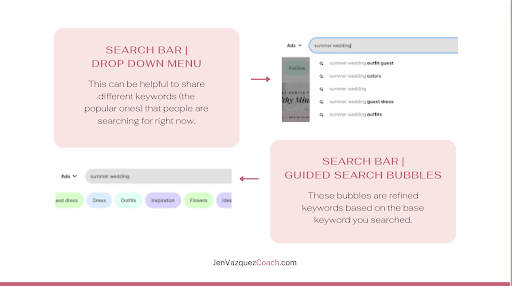
Search Bar | Drop-Down Menu

One of the areas to search is the drop-down menu. When you type something into the search bar, Pinterest will suggest a variety of different options for you to choose from, just like Google does. This can be helpful to share different keywords (the popular ones) that people are searching for right now.  Write all of the keywords on your keyword builder that make sense for your business.

Be sure to check the “all Pins” option to the right of the search bar as it defaults to “your pins” and that won’t be helpful at all to finding new keywords.

Search Bar | Guided Search Bubbles

Not all people depending upon where you live have access.  If you’re one of the lucky pinners who still have access to the guided search then you can use the suggested keywords there as well. 

Guided search bubbles are the keywords in colored bubbles just under the search.  These tiles are refined keywords based on the base keyword you searched.

BONUS POINTS:  If you click on one of the guided search bubbles, you’ll be able to drill down to get even more.  You’ll basically be starting the whole process over again with the drop-down menu and guide search bubbles.  Below I clicked on Dress under the search Summer Wedding and got these new keywords.

Keywords Pinterest 101 in 2023 by Jen Vazquez Media

Pinterest Ads (without paying for the Ads)

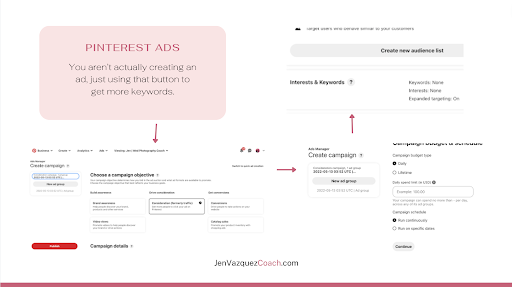
Another way of finding keywords on Pinterest is to use the Keyword Planner Tool which is located under “create ad” function under the Ads Menu on Pinterest.  You aren’t actually creating an ad, just using that button to get more keywords.  Here are the steps:

Click on “Ads” in the Menu and click the “create ad” button.

Notice the “drive consideration” column? Click on Consideration (formerly traffic).  Ignore all the other options and scroll down to click “continue”.  

Now click “find new customers” toward the bottom as the targeting strategy.  Now scroll down again to the area that says “keywords and interests” and click on it.

Select “add keywords”.  You’ll type in the main keyword you want to do research for, then the keyword planner tool will give you related keywords that may fit your business needs.  Again as always, write them down (or type them) into your keyword builder.  

Keywords Pinterest 101 in 2023 by Jen Vazquez Media

Pinterest Trends

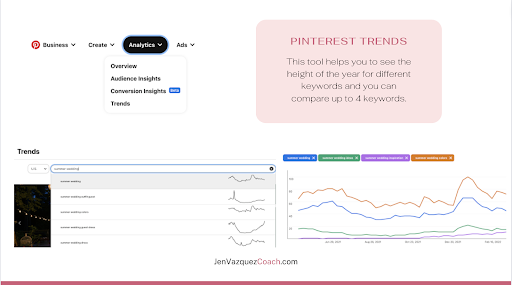
There are a few ways to access Pinterest Trends.  You can click “analytics” in the menu on Pinterest and select Trends or you can go to pinterest.com/trends.

Now Pinterest Trends isn’t as robust as we business entrepreneurs would like and you can’t find all of the keywords you search, but Pinterest is consistently updating this area as more keywords are searched. This tool helps you to see the height of the year for different keywords and you can compare up to 4 keywords.  It will share the search volume for each of the four so you know which of the 4 keywords are the best.  

First step is to select your country.  Then, type in a keyword.  A drop down menu will appear, just like when you search for a keyword in the search bar.  You’ll find additional keywords that you should write down on your Keyword Builder, provided it fits your business.

In this example I searched for summer wedding.  I clicked on summer wedding the first result in the drop down menu and this is what I found.

Note that the height of popularity is around December 20th for the last year.  It may be surprising as that winter, but this is actually typical.  Most wedding searches happen during engagement season between Thanksgiving and New Years.  People get engaged as start searching on Pinterest for #allthethings.

Now under this result you see related trends and popular pins. 

Next we’ll compare keywords to see which is most popular by searches on Pinterest.  You can do that by clicking on the related trends buttons. 

In this trend search, summer wedding colors is the most popular.  Again, write down the keywords on your keyword builder, not just the most popular as you want to utilize a variety of keywords when you make pins so you have a better chance at getting in found.

How To Find Keywords Off Pinterest

Here are some places you can find keywords for free off of Pinterest:

Write Your Research Down

So you know keywords are important and I’ve shared many areas that you can research to find keywords for your business, now I’ll show you how to log them.

My gift to you: Get Your Keyword Builder Here. Use this to keep track of your keywords so when you pin, it’s super easy to look at all the keywords and chose multiple for pins that are for the same blog but using different keywords to get better reach and results on Pinterest.

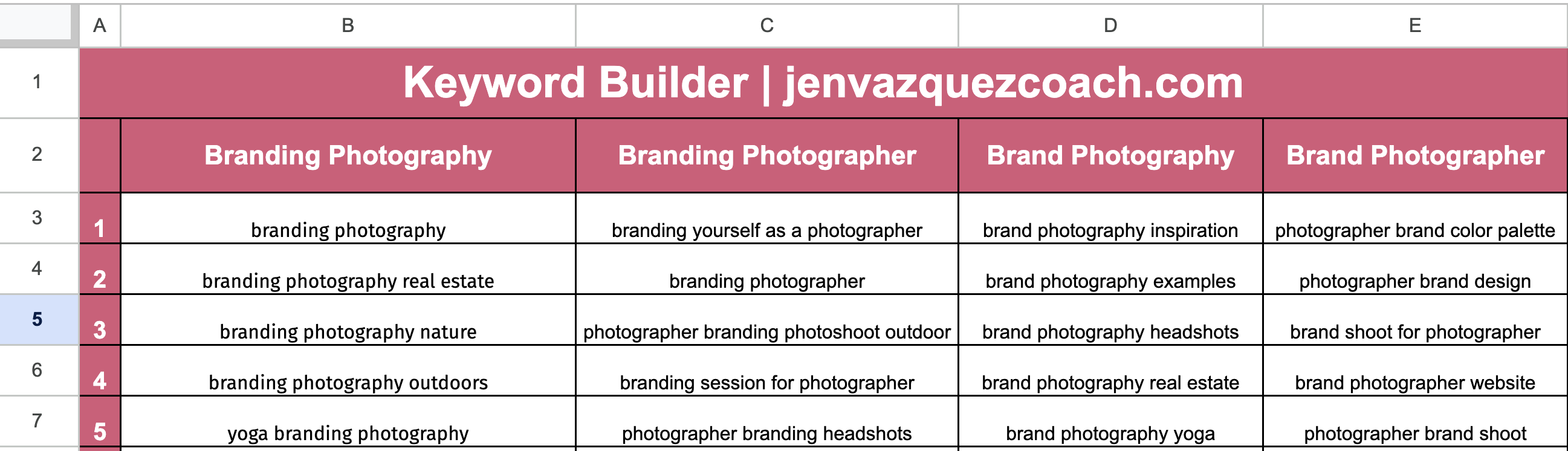
On the Keyword Builder, you’ll find a header and a column underneath. The goal is to look at your blog categories and/or your pillars of content in those headers. 

In the example here, I share a tiny snapshot of our agency’s client who’s a brand photographer Keyword Builder. (note not all keywords are on the snapshot and the most important keywords are local based keywords!) 

keyword builder partially filled out by Jen Vazquez Media

When To Do This Research

I’m covering this in the second blog in the series because I recommend everyone start with a researching when you start using Pinterest.  But I also recommend doing another session of researching every 6 months or so to be sure to capture new keywords as searches can change.

Note: Avoid using industry specific keywords as they will just draw the attention of others in your industry. 

PinterestMarketing 101-Keywords by Jen Vazquez Media

Where To Use Keywords On Pinterest

As you’ve learned, keywords are the bread and butter of any Pinterest marketing strategy – without them, you’re likely to get lost in the shuffle and miss out on valuable exposure. But as with all things in life, there’s a right way and a wrong way to go about using keywords on Pinterest. The golden rule? Never keyword stuff! This means sprinkling your keywords in haphazardly, in a bulk list, or stuffing them into sentences where they don’t naturally belong. 

Not only will this make your content difficult to read, but it will also flag your account as spammy which could hurt your chances of being found in search. Instead, use your keywords thoughtfully and sparingly, making sure that they always flow naturally within the context of your sentence. following this simple rule will make a world of difference for your Pinterest marketing efforts!

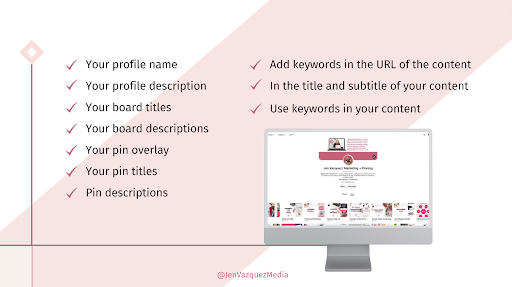
Keywords Pinterest 101 in 2023 by Jen Vazquez Media an image with places to share keywords on an image of a computer screen with Pinterest on it.

Where To Put Keywords

Here are the places to use keywords on Pinterest.  All of these area are searchable on Pinterest.  Pinterest considers all of these area to learn what your content is about and serve your content up to your ideal clients:

  • Your profile name: Choose a main keyword that describe your content or your business.
  • Your profile description: Using keywords, describe the transformation you offer clients.
  • Your board titles: Use main keywords name your boards. Avoid using cutsy names as they won’t be found by your ideal clients. 
  • Your board descriptions: You can use keywords in your descriptions to Pinterest and your ideal clients what they will find on your board.
  • Your pin overlay: Pinterest can “see” your image to take that along with the other areas to match with people that will find that content valuable. Choose a main keyword that describes what they will learn when they click on your pin and go to the content (blog, youtube, podcast, etc.).
  • Your pin titles: Pin titles are considered by Pinterest to categorize your content.
  • Pin descriptions: You can use alternatives to your keyword on your pin title or text overlay in sentences to get the best opportunity to get found.

Bonus Areas To Use Keywords

  • Add keywords in the URL of the content attached to the pin
  • In the title and subtitle of your content
  • Use keywords in your content
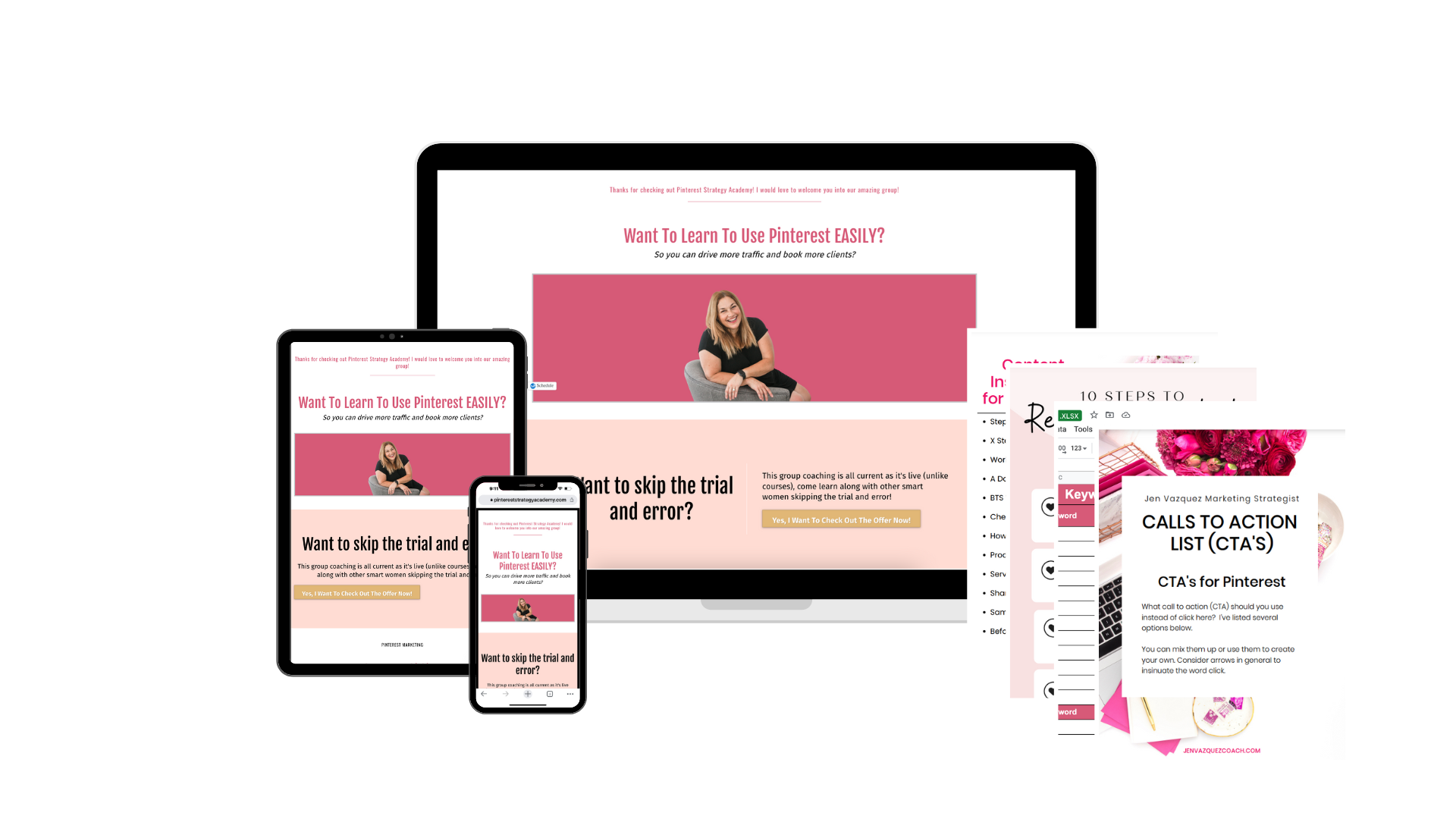
Pinterest Strategy Academy by Jen Vazquez Media image of laptop, ipad, cell phone and sheets of paper showing all that's included

Summary

So you’ve learned all about keywords!  Why you should use keywords, how to use keywords, where to use keywords and how to log them on my free Keyword Builder.

You know you should do this research when you first start using Pinterest for your business and that you should repeat it every 6-12 months to stay updated.

I’d love to share something that can really help you when you have Pinterest questions but also as accountability to get that pinning done!!  It’s my DIY service (with your friendly Pinterest experts along to help!). 

Pinterest Strategy Academy

Pinterest Strategy Academy Group Coaching Means…

…lose the overwhelm when marketing your business. Learn easy and simple systems to spend less time and book more clients.  What’s included?

  • Weekly LIVE Q+A Sessions where you can ask questions
  • Weekly LIVE Pinning Sessions where you’ll pin to Pinterest (excellent accountability)
  • Monthly LIVE Masterminds – Diving deep into different skills
  • Guest Speaker
  • Monthly Pin Templates via Canva and Downloads

These bonuses make Pinterest Strategy Academy unlike any other Pinterest offer.

01: Access To Me (Your Personal Expert)

As sessions are live, you have access to me to ask all sorts of questions about how you like to work to your specific business and it’s needs

02: Guest Speakers

I have incredibly talented friends in the Marketing space. I invite them to come and teach their specific expertise like Pinterest Ads and Instagram.

03: Replays

Each Mastermind is recorded so you can access it if you aren’t available at that time/date. Q&A Sessions + Pinning Session are also recorded, if there is any education on the call

04: Downloads

There are a ton of downloads that make your marketing so much easier like an 80 Calls to Action cheat sheet, My Marketing System Check List, Pinterest Analyzer and so much more

05: Private Facebook Group

I have a private Facebook group where you can chat with me and the other members to share your pin, blog post or anything else

06: Tailwind

I offer a Tailwind Trial and education on how to use this valuable 3rd party tool to make Pinterest EVEN EASIER. 

If you have any questions, send me a DM on IG or send me an email.

Don’t Forget to Pin It!
PinterestMarketing 101-Keywords by Jen Vazquez Media

Pinterest 101 in 2023: Why Use Pinterest for Your Service-Based Business (Part 1)

Pinterest 101 in 2023 - Why Use Pinterest for Your Service-Based Business part 1 by Jen Vazquez Media

Pinterest 101 for 2023: Why Use Pinterest for Your Service-Based Business

Pinterest 101 Series

Are you wanting to jump on Pinterest for your business? Are you already on Pinterest for your business but it doesn’t seem to be working?  Are you curious about using Pinterest for your business? If any of those questions resonated with you, then keep reading!

Can you believe it? I’ve been using Pinterest for my photography biz since 2009 – back when it was invite-only in beta!  And you know what? I didn’t keep all that Pinterest goodness to myself. Oh no, I helped my wedding pro friends figure it all out, and then launched Jen Vazquez Media in 2018 so I could help even MORE people!

Since 2018, I’ve been teaching Pinterest but let’s be real – I’ve bounced around a bit with all the questions I get and news or new tools that Pinterest launches. But, fear not! I’ve decided to take all of you business owners on a journey through Pinterest 101 over the next several blogs. That’s right, you can go from blog to blog and get all the help you need to master Pinterest like a pro!

In 2022, I was honored to be selected by Pinterest to be a Pinterest Pioneer helping in the Pinterest Business Community and also working with Tailwind to educate on Pinterest. These two honors are the highlights of my business!

Last weekend, I had an epiphany.  I realized that I haven’t created a whole series for those of you who are brand new to the Pinterest world – like, starting from scratch with no Pinterest Business account OR you’ve been using Pinterest for your business but you don’t feel like it’s working.

Whether you’re a total newbie or a seasoned pro, there’s something for everyone in this series. And TBH, there’s a lot of conflicting information out there. That’s why I always say if the Pinterest advice is older than six months, it’s probably as outdated as a pair of platform shoes (although are they coming back???).

Let’s start from the very beginning, shall we? We’re going to dive into all the juicy tweaks and details that’ll take your Pinterest business account from boring to mind-blowing and from not quite there to as effective as possible to get the most reach you can to skyrocket your business leads! Trust me, you won’t want to miss out on this ride.

So buckle up, my fellow Pinners, and let’s dive in!

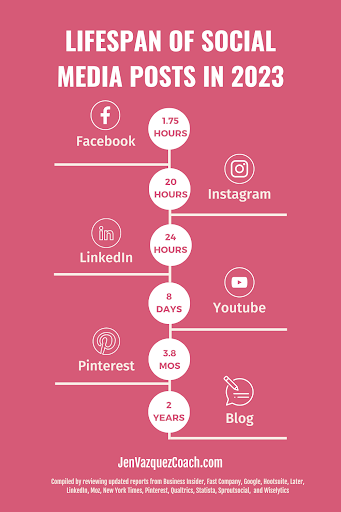
graph showing the lifespan of social media posts in 2023

Why Use Pinterest

Holy moly, there are countless reasons why Pinterest is a must-have tool for your business. But, let me hit you with some hard facts that will have you jumping on the Pinterest train in no time:

A bonus about Pinterest is the ultimate low-energy social media platform. There are no bullies here, just good vibes and inspiration! It’s a place where you can go to change your life and discover new ways of doing things. Talk about positive energy!

But, here’s the best part: Pinterest is the easiest social media platform.  My clients spend about an hour scheduling out your pins and have your next week or two covered. And the best part? It gives the biggest bang for their time buck. Trust me, you won’t want to miss out on all the benefits that Pinterest has to offer!

More stats that will shock and encourage you to try Pinterest for your business is the Lifespan of a Pin compared to other social media platforms.  Would you rather spend hours and hours on Instagram and continually have to create content, or spend an hour a week and have pins last year?  That’s right I have several pins that are still popular from 2014!  Here are 2023 stats for social media platforms:

    • TikTok Negligible unless you “go viral”
    • Facebook 1.75 hours
    • Instagram 20 hours
    • LinkedIn 24 hours
    • YouTube 8 hours
    • Pinterest 3.8 months
    • Blogs 2 years

Pinterest Business Account vs. Personal Account

Pro Tip: Consider if you want to manage two accounts.  If you don’t, convert your personal account because you can still pin, you’ll just have all your personal pins on a secret board.

It is imperative to have a business account if you want to use Pinterest to market your business.  There are two ways to do that. One is to convert your personal account to a business account and the second way is to create a new account as a business account. 

Choosing a username (the URL link https://www.pinterest.com/jenvazquezmedia) you want to use your business name or a version of your business name.  This way, when people search for your business, they find your profile, boards, and pins.  It’s the magic key that unlocks the door to your Pinterest account.  


Convert your Personal Pinterest Account to a Business account:

  1. Go to https://business.pinterest.com/ and click on the “Convert to a business account” button.
  2. Enter your personal account information and click on the “Convert” button.
  3. Follow the on-screen instructions to complete the process of converting your account to a business account.

Create a business account:

  1. Go to https://business.pinterest.com/ and click on the “Create a free business account” button.
  2. Follow the on-screen instructions to complete the process of setting up your business account.

Summary

To sum it all up, Pinterest is a powerful tool for businesses with over 450 million monthly active users and less competition compared to other social media platforms. It’s a low-energy platform that provides inspiration and positivity, and it’s also incredibly easy to use, with an hour of scheduling out pins enough to cover your next week or two. Plus, pins have a much longer lifespan than other social media platforms. And, we’ve also discussed the importance of having a business account on Pinterest and how to create one.

In this Pinterest 101 series, we’ll take you through everything you need to know about using Pinterest for your business. We’ll cover topics such as optimizing your profile, crafting killer pins, mastering Pinterest SEO, and how to read the analytics. So, buckle up and get ready to take your Pinterest game to the next level!

Next up Keywords! It’s a secret power to making Pinterest work for you!

Don’t Forget to Pin It!
Pinterest 101 in 2023 - Why Use Pinterest for Your Service-Based Business part 1 by Jen Vazquez Media

7 Ways You Can Make Money On Pinterest

7 Ways You Can Make Money On Pinterest Jen Vazquez Media

I’m so excited to share with you 7 Ways You Can Make Money On Pinterest.

Get ready to unleash the secret weapon in your marketing arsenal! Pinterest may be a hidden gem, but it’s a FREE and super-powered platform that your business simply can’t ignore, plus it can help you to make more money in your business!

A couple of things to note:

  • You need to have a Pinterest business account
  • You need to claim your website
  • You need to be using very strategic keywords that entice people to click
  • You need to be consistent. 

If consistency is a problem, you can use Tailwind to do all of the pinning for you, you simply load in the content and it drips it out over time on the best dates/times for you.

OR you can outsource it to someone like me.

Now that the Pinterest Creator Rewards program is ending I thought I’d share all the ways (besides that) that you can make money!

Working with Brands by Partnering

Yes, that’s right, you are able to be a Pinterest Influencer!   

Partner up with your favorite brands and let the magic happen! A paid partnership is where a creator, like you, teams up with a brand to create awesome content that promotes their products. All you have to do is tag the brand in your Pinterest Idea Pin, and voila! The “Paid Partnership” label will appear, making it clear to everyone that you’re working with the brand. Just make sure the brand approves the tag first, so their name can shine alongside yours!

You can learn all about this on Pinterest 

Most Pinterest partnerships are often formed outside of Pinterest, but some people have connected with brands through Pinterest by creating an Idea Pin, talking about a product they love, and then tagging that brand! 

And if that brand really loves your content, they could turn that idea pin into an ad they pay for.  This will help YOU get more exposure!

To get the best chance are getting those brand deals, you’ll want to see what content they create and use that as inspiration for something you want to do. 

 Increasing your engaged audience, getting more impressive and followers will also help to entice them to work with you.

Make Your Idea Pins Shoppable

Get ready to make shopping a breeze for your audience! When you tag products in your Idea Pins, you’re giving your followers the power to shop your picks with just a few clicks. All you have to do is search for the product you want to recommend and tag it in your Pin.

It’s that simple! Your followers will thank you for making their shopping experience effortless.

7 Ways You Can Make Money On Pinterest Jen Vazquez Media

Create Affiliate Idea Pins

Affiliate marketing is an amazing way to build passive income as you can receive a commission when someone sees your content and makes a purchase.   ]

While you can link directly to the affiliate link, be sure to try linking to a blog post where that content is.  You’ll make google happy and the links to your claimed website typically get the best reach.

Make sure you don’t mess with the FTC!  Clearly, state when affiliate links are being shared within a piece of content.

PRO TIP:  Pinterest discourages link shorteners or tools that disguise the final URL when sharing affiliate links.

Send Traffic to Your Blog

Getting people to your blog helps Google to feel the love and spread your website to more people in searches, helps you create that know, like, and trust, and helps the Pinner to discover new information or find inspiration for free!

Creative Marketing Summit

The Creative Marketing Summit can help you transform your service-based business with valuable insights and actionable strategies on how to find, attract, and book your ideal clients at our marketing summit.

Send Traffic to Your Services

Create pins for your services as people are looking for your services on Pinterest.  Create pins that are your brand colors but also try other colors to appeal to more people.  Use a variety of keywords on multiple pins til you find the sweet spot or keywords that work best for your ideal client.

Send Traffic to Your Freebies/Lead Magnets

Pinterest is amazing for lead magnets and the pins stick around and stay around sending consistent traffic to your lead magnet growing your email list.

  • Create a Lead Magnet (Cheatsheet, Quiz, and Checklist are best)
  • Create several pins (using different images and text overlay) that link to that blog post
  • Pin those pins to Pinterest on multiple boards that make sense over time (not all at once) or use Tailwind to be able to send it all at one sitting and Tailwind will drip it out for you!
  • It’s important to make sure that you have 3-5 welcome emails that auto send each day after they sign up telling them who you are, how you help, what services you have and a call to action to take the next step. 
  • And in the last email, you give them an offer (course, membership, or service)
7 Ways You Can Make Money On Pinterest Jen Vazquez Media

Send Traffic to Your Youtube Channel / Podcast

Really smart Youtubers and Podcast hosts are using Pinterest to drive more traffic to those platforms.  It drives traffic over days, weeks, months, and even years, so why wouldn’t you?

Don’t Forget! Help Is Available

Don’t Forget to Pin It!
7 Ways You Can Make Money On Pinterest Jen Vazquez Media