Pinterest Marketing for Service Providers: How to Attract Clients While You Sleep

flatlay workspace for female entrepreneur jvm stock photos

Pinterest Marketing for Service Providers: How to Attract Clients While You Sleep

If you’ve been posting your heart out on Instagram chasing trends and still not seeing consistent leads, I totally get it. Here’s the truth — your dream clients are probably hanging out somewhere quieter… somewhere they’re actually looking for help, not just scrolling for entertainment.

Yep, I’m talking about Pinterest.

I’ve used Pinterest to grow my own six-figure business and helped hundreds of female service providers like photographers, wedding pros, coaches, and other creatives. And the best part? You don’t need to dance on Reels or spend every waking moment online.

In this post, I’m breaking down exactly how to use Pinterest to attract clients and build a marketing system that keeps working even when you’re not.

Create Consistent Content Without the Burnout

Pinterest loves fresh content — but that doesn’t mean you need to post every single day, but you need pins going out each day.

The secret is consistency that fits your life.

Most of my clients spend about one hour a week on Pinterest marketing using my batching system. They repurpose blog posts, videos, podcast episodes, lead magnets, and services into multiple Pins that drive traffic all week long.

You don’t have to start big — once a week is enough when it’s done strategically. Think of Pinterest as your long-game traffic engine. You post once, and it keeps bringing you visitors for months (and often years).

Pro tip: Use a scheduler like Tailwind and batch your Pins all at once. It’s like setting your marketing on cruise control.

Speak to What They’re Searching For

The magic of Pinterest is that people come to it with a goal. They’re planning, researching, or dreaming about something they want to do next.

So before you create, ask yourself this:

“What is my ideal client typing into that search bar when they’re ready to take action?”

If you’re a wedding photographer, it might be San Jose vineyard wedding inspiration.  If you’re a coach, maybe it’s how to get clients without social media.

Create content that answers these searches directly. When you solve a problem or ease a pain point, you naturally build trust — and that’s where the conversion begins.

I love using my Feel, Felt, Found storytelling method:

“I know how you feel. I’ve felt that way too. But here’s what I found that really works.”

It connects, educates, and converts all at once.

Want help with Pinterest?

The Club is where service providers learn how to make Pinterest their lead-generating bestie. You’ll get monthly action plans, keyword sessions, and strategy support to grow your traffic, leads, and visibility—without spending hours online.

Use Keywords Like a Pro

Pinterest isn’t a social media platform — it’s a visual search engine. Think of it as SEO with prettier pictures.

Your captions, titles, and even image file names help Pinterest understand who to show your content to. Here’s how to start:

  • Write down short-tail keywords like Pinterest marketing or Bay Area brand photography.
  • Then add long-tail keywords like Pinterest for service providers or how to grow your coaching business with Pinterest.

Sprinkle them naturally throughout your Pin titles, descriptions, profile, and even on the text overlay of your Pins. And remember: keywords aren’t about gaming the system — they’re about helping Pinterest connect your content with the right people.

Pro tip: Inside The Club, we do keyword brainstorm sessions a few times a year to help members find the perfect words for visibility and growth.

Make Your Visuals Work Harder

Pinterest is visual, but that doesn’t mean you need fancy designs. You just need clarity.

Here’s what works best for service providers:

  • Use your brand colors, fonts, and website address for recognition.
    Keep designs clean and text easy to read on mobile.
  • Add a headline that solves a pain point (How to Book Clients from Pinterest).
  • Include a simple call-to-action like Learn More or Download Free.

You can create gorgeous, on-brand Pins in Canva in minutes — no design degree needed.

If you want a head start, grab my Canva customizable 10 free Pin templates. 

Pro tip: Mix static and video Pins for your blogs, freebies, and services to keep your content fresh and engaging.

Convert the Clicks

Traffic is great — but it means nothing without conversions. Most Pinterest users are new to your business, so your job is to guide them toward a small win.

Here’s how to optimize for conversions:

  1. Link to related content like blogs, podcasts, or YouTube videos.
  2. Add a freebie or email opt-in to capture leads.
  3. Include a clear call-to-action (CTA) in every post — and put it in the middle of your blog since not everyone reads to the end.

Pinterest is the top of your funnel — the start of a relationship that leads to sales later.

One of my photography clients doubled her bookings just by linking her free wedding guide and inquiry form to every single Pin. No ads. No daily posting. Just a smart Pinterest system.

Ready to Bring in Clients While You Sleep?

Pinterest isn’t about luck — it’s about strategy, consistency, and systems that do the work for you.

If you’re ready to stop guessing what to post and start generating clients with ease, check out The Club, where we build your Pinterest strategy together step-by-step.

Or if you’d rather hand it off completely, explore my Pinterest Management Services and let my team handle it for you.

Either way, Pinterest can become your silent sales machine — and I’ll show you exactly how to make that happen.

DON’T FORGET TO PIN IT!

A Pin that says Stop Scrolling, Start Growing Pinterest Marketing for Service Providers
A Pin Saying "Pinterest That Converts Pinterest Marketing for Service Providers"
A Pin saying, "Attract Clients While You Sleep Pinterest Marketing for Service Providers"
A Pin saying, "One Hour a Week Strategy Pinterest Marketing for Service Providers"
A Pin saying The Silent Sales Machine Pinterest Marketing for Service Providers

Pinterest Marketing in 2026: What’s Working Now for Time-Strapped Service Providers

female entreprenur typing on laptop with marketing stats jvm stock image

Pinterest Marketing in 2026

If you’ve been wondering whether Pinterest is still worth it for growing your business in 2026, the answer is a big, sparkly yes.

Pinterest remains one of the most powerful and low-stress platforms for showcasing your content to people actively searching for inspiration, information, and solutions.

Unlike Instagram or TikTok—where your content disappears in 24 hours or less—Pinterest quietly works for you in the background, bringing in leads, website traffic, and email subscribers long after you hit publish.

For service providers, photographers, coaches, and other creatives, this is gold. You’re not chasing trends; you’re building a system that keeps your business visible 24/7, even while you’re spending time with family or focusing on client work.

However, Pinterest in 2026 doesn’t resemble what it was like five years ago. The platform has matured, users are savvier, and the algorithm now rewards quality and consistency over quantity. That’s where my Pin + Attract Method comes in.

It’s the same system I use for my Pinterest management clients and inside The Club to turn pins into paying clients without the constant hustle or guesswork. Let’s walk through exactly how to make Pinterest work for your business this year.

1. Start with a Strong Foundation

Before you pin anything, your Pinterest business account needs to clearly tell the platform who you are and who you help. When Pinterest understands your business, it knows which users to show your pins to—meaning better reach, higher click-through rates, and a steady stream of the right kind of traffic.

Here’s what to focus on:

Switch to a business account. If you’re still using a personal account, it’s time to upgrade. A business account gives you access to analytics, Ad Manager (even if you never run ads), and advanced audience insights.

Claim your website and socials. This connects your content and gives Pinterest extra trust signals that you’re legitimate. Here’s a video to share how to do that.

Use a professional photo and banner. Your banner should tell people in 2.5 seconds who you are and who you help. Your photo should look confident, approachable, and aligned with your brand. If you’re a photographer, use one of your own branded images.

Write a keyword-rich bio. Use natural phrases that your ideal clients would search for, such as “Helping photographers and coaches attract dream clients using Pinterest marketing made simple.”

Create boards that mirror your offers. Think of each board like a mini SEO category.

  • For coaches: Pinterest strategy for coaches, lead generation tips, small business workflows, marketing mindset.
  • For photographers: brand photography tips, posing ideas, Pinterest for photographers, and client wardrobe inspiration.

Keep ten to fifteen well-optimized boards instead of fifty you rarely use. Always prioritize quality over clutter.

2. Do Smart Pinterest Keyword Research

Pinterest is a visual search engine, not a social network, which means SEO is everything. Your keywords are the bridge between your content and your ideal clients.

Here’s how to find the best ones:

Use Pinterest’s search bar 

Pretend you’re your client. Type in what they’d look for, like “YouTube strategy,” and pay attention to the suggested phrases that pop up. Those are your top keywords.

Check Pinterest Trends 

Go to trends.pinterest.com or access it through your Analytics tab. This free tool shows what’s gaining traction in your niche and when those topics peak. If something peaks in December, you’ll want to start pinning about it by October.

Group your keywords by theme

For coaches: business mindset, client attraction, evergreen funnels.
For photographers: brand photography, posing ideas, and client experience.

Sprinkle your keywords throughout your account

Include them in your bio, board titles, board descriptions, pin titles, and pin descriptions. Make sure they align with your landing page or blog post content. Write for humans, not robots—use natural sentences instead of keyword stuffing.

Pro tip: Ask your audience on Instagram. Post a story question like “If you were looking for this, what would you type into Pinterest or Google?” Then add their responses to your keyword list.  If you don’t have a keyword list, get my Keyword Builder free.

And if you’d like help getting started, you can download my free Pinterest Keyword Builder. It’s one of my favorite tools to help you organize, save, and track your best keywords.

3. Clarify Your Content Pillars

You can’t pin everything under the sun, and that’s actually a good thing. Focus on three to four content pillars—the topics you want to be known for and that connect directly to your services and client needs.

If you’re a photographer, your pillars might include brand photography ideas, posing and confidence tips, Pinterest marketing, and workflow systems.

If you’re a coach, maybe your pillars are mindset, productivity, list growth, and content repurposing.

Pinterest rewards consistency. When it sees you pinning around similar themes regularly, it knows who to show your content to.

Even if you’re not a blogger, you still need blog-style content. This is what feeds Pinterest fresh ideas to share, and it helps boost your visibility on Google, too.

4. Create Fresh Content Consistently

This is where most people fall off. They stop creating new content and assume Pinterest isn’t working—but Pinterest rewards freshness. That means new images, new titles, new keywords, and new URLs.

You don’t need to pin manually every day, but you do need to have pins going out daily.

Here’s my recommendation:

  • Blog weekly, even if it’s short.
  • Batch your pinning once a week or once a month.
  • Repurpose existing content like YouTube videos, podcast episodes, lead magnets, and Instagram carousels or stories into new pins.

Think of it this way: one piece of content can become five pins.

Pro tip: Create a secret Pinterest board just for content ideas. Anytime inspiration strikes, save it there so you never start from scratch.

5. Design Scroll-Stopping Pins

Pinterest is visual first, so design matters. Strong pins have three things in common:

  1. Bright, clear images with minimal clutter.
  2. Readable text overlays using bold, simple fonts.
  3. Clarity and curiosity in the title.

For example, instead of “Pinterest Marketing,” use “How to Get Clients from Pinterest in 2026 for photographers.”

Keep your branding consistent—use your brand colors, fonts, and URL. But don’t be afraid to test new designs. Search your target keyword and notice which pins stand out visually. Try four on-brand designs and one “wild card” that looks different from the feed to capture attention.

Also, experiment with both vertical static images and video pins. Video performs especially well in 2026 for educational and tutorial-style content.

To help make pins faster, snag my free customizable Pinterest Pin templates here. Or simply use Tailwind’s Create.

6. Commit to a Consistent Pinning Schedule

Pinterest loves consistency, but that doesn’t mean you have to manually post every day. Scheduling tools like Tailwind make this effortless.

Tailwind allows you to batch a week or even a month of pins in one sitting and automatically publish them for you. It’s one of my favorite tools for saving time and staying consistent. There’s even a free plan you can try—grab the link below to test it out.

For 2026, here’s what’s working best:

  • Minimum: 1–3 pins per day
  • Ideal: 5–10 pins per day
  • High-volume bloggers: up to 20–30 pins per day (not necessary for most service providers)

What matters most is showing up regularly, not pinning 100 pins one day and nothing the next.

Pro tip: Schedule your new content first, then sprinkle in your best-performing older pins once or twice a month for variety.

7. Track, Tweak, and Celebrate Wins

Most business owners skip this part, but tracking your Pinterest data is what helps you grow faster.

Pinterest is a search-based platform, so it takes time to see results—but it compounds beautifully over time.

Check your analytics monthly and look for:

  • Top-performing pins (which visuals and keywords drive the most clicks)
  • Outbound clicks (which pins send the most traffic to your site)
  • Engagement rate (which pins are being saved most often)

Don’t panic if your numbers fluctuate. That’s normal, especially with seasonal behavior. Weddings peak in spring, while coaching and goal-setting content tends to spike in January.

Use Pinterest Trends to plan ahead, so your content is ready before your audience starts searching.

Bonus: Integrate Pinterest into Your Workflow

Pinterest shouldn’t feel like an afterthought. When you build it directly into your marketing routine, it becomes your most consistent traffic driver.

Here’s a simple example:

  • Write a blog post and create three to five pins for it.
  • Record a podcast episode and post a short blog-style recap with a pin graphic.
  • Launch a freebie and design a dedicated pin just for it.

When Pinterest becomes part of your workflow, it stops feeling like extra work and starts consistently driving leads.

Ready to make Pinterest your 2026 lead machine?

If this clarity is exactly what you’ve been craving—but you’d rather not do it alone—you’ve got options:

Let’s turn your pins into paying clients—all year long. 💖

DON’T FORGET TO PIN IT!

feminine desk with laptop and analytics on the screen with pink accessories and green plants
women typing on laptop with analytics on a desk with pink flowers
feminine office with laptop with marketing analytics on it, pink accessories and green plants
feminine desk with laptop and analytics on the screen with pink accessories and green plants

Pinterest Presents 2025: What Service Providers Need to Know About the Latest Updates

Pinterest Presents 2025: What Service Providers Need to Know About the Latest Updates on Marketing Strategy Academy Podcast by Jen Vazquez<br />

Pinterest Presents 2025: What Service Providers Need to Know About the Latest Updates

I’ve been using Pinterest since it was still in beta back in 2009 — you had to get an invite to even join! And from day one, it’s been my favorite platform because Pinterest is the only place that actually gives you all the data and insights you need to successfully market your business.

One of the ways they do this is through Pinterest Presents, which has become an annual favorite of mine. They always keep it fun and playful (yes, even bringing in well-known actors), while still packing in powerful updates. And this year was no different — it was full of announcements that really matter if you’re running a service-based business. Whether you’re a coach, photographer, or wedding pro, these changes can make Pinterest your go-to place for leads and visibility.

Let’s break it down in a way that’s simple and actionable.

Why Pinterest Is Still Growing (and Why You Should Care)

Pinterest now has over 578 million monthly users, and more than half of them are Gen Z. Translation? This platform isn’t slowing down anytime soon. And here’s the kicker: people on Pinterest are 70% more likely to take action — like clicking through to a site or buying something. For service providers, that means it’s not just about pretty inspiration boards anymore. It’s about connecting with potential clients who are ready to act.

The Big Updates from Pinterest Presents 2025

Here’s what Pinterest announced and why it matters:

  • New Ad Features: In-stock product info, “where to buy” links, and automatic promotions for sales events. Even if you don’t sell products, you can use this model by showcasing your packages or offers in a clear, clickable way.
  • Pinterest Performance+: Smarter automation with AI for things like image cropping and ROAS bidding. This helps you save time while making ads work harder.
  • Shopping-Friendly Boards: Boards are becoming more like mini storefronts. Service providers can repurpose this to organize offers (coaching packages, photo sessions, retreats) in a way that drives clicks.
  • Trends Tool Upgrade: Get insights into ideas up to 90 days before they peak. This lets you create content before your competitors even know what’s coming.
  • Full-Funnel Focus: Pinterest is doubling down on awareness, consideration, and conversion — all in one platform. That’s huge if you’re tired of juggling five different platforms to get clients.

💡 Ready to make the most of these Pinterest updates?

If your account feels messy (or you’ve never set one up the right way), my Pinfluence Clean Up + Set-Up service is exactly what you need. I’ll optimize your profile, boards, and pins so you can start attracting leads without the overwhelm.

What This Means for Service Providers Like You

If you’ve ever thought, “Pinterest is just for products,” think again. These updates open doors for service businesses, too:

  • Turn your services into “offers” with clear calls-to-action.
  • Use the Trends tool to create content on topics your audience is already searching for.
  • Lean on AI automation to save time while running smarter campaigns.
  • Build a funnel on Pinterest: awareness pins to attract, then retargeting pins to convert.

Quick Wins to Try This Week

  1. Refresh your Pinterest boards and organize them around your core offers.
  2. Create one Pin using an upcoming trend from the new Trends tool.
  3. Test Performance+ with a small ad budget.
  4. Write a blog (like this one!) and pin it to a shopping-friendly board.
  5. Set up two campaigns: one for awareness and one for conversions.

Final Thoughts

Pinterest Presents 2025 proved that Pinterest isn’t just keeping up — it’s getting ahead. For service providers who want more leads without spending endless hours on social media, this is the platform to watch. The best part? You don’t need to overhaul your whole marketing plan. Just start small, stay consistent, and let Pinterest do the heavy lifting.

DON’T FORGET TO PIN IT!
Pinterest Presents 2025_ What Service Providers Need to Know About the Latest Updates on Marketing Strategy Academy Podcast with Jen Vazquez

The 3 Pinterest Metrics That Actually Matter for Service Providers

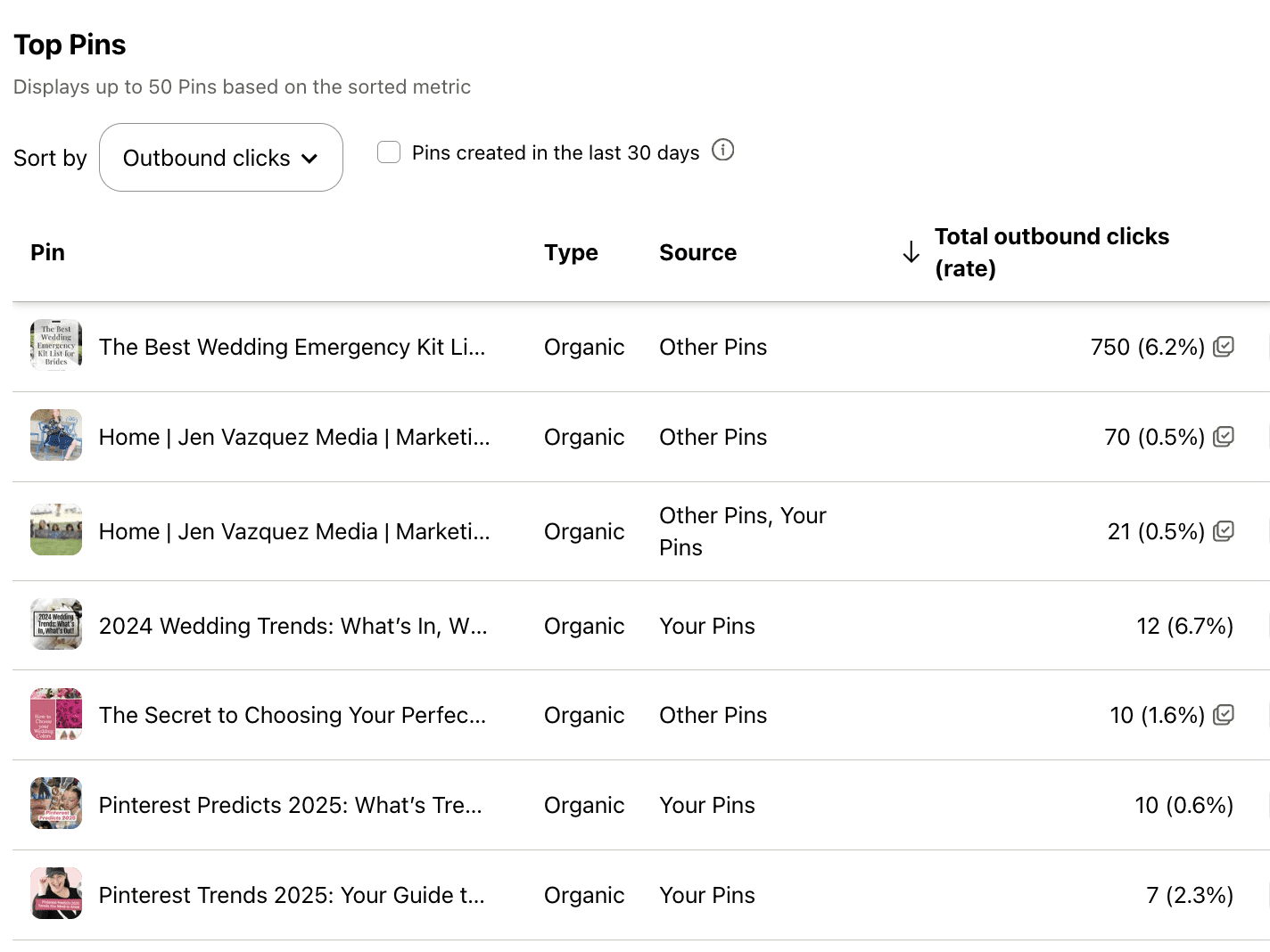
Screenshot of Pinterest Analytics to talk about The 3 Pinterest Metrics That Actually Matter for Service Providers

Well, hey there. Be honest—have you ever opened your Pinterest analytics and thought, “What the heck do all these numbers even mean?” You’re not alone. In fact, I hear this from so many clients and students inside my programs.

So today, let’s break it down. I’m going to show you exactly which Pinterest metrics matter most—especially if you’re a service provider trying to get more leads from your content. We’ll skip the fluff and focus on what actually moves the needle in your business.

Why Pinterest Analytics Matter

You’re probably already showing up on Pinterest, creating fresh pins, maybe sharing your blog posts or free resources—but how do you know it’s working?

That’s where analytics come in.

Tracking just a few key metrics can help you figure out what content is connecting and where to spend your energy. It doesn’t have to be complicated. You only need to focus on three simple data points each month—and that’s what we’re diving into today.

Metric #1: Outbound Clicks

Outbound clicks are what I like to call the “money clicks.” These are people who found your pin, clicked it, and landed on your website. That is a big deal.

It’s the number one metric I track for my Pinterest management clients because clicks show your content is doing its job. It’s not just being seen—it’s driving action.

Now, if you’re getting a lot of clicks but not a lot of conversions, it might be time to take a closer look at your website. Make sure it’s easy to navigate, clearly speaks to your ideal client, and helps them take that next step with you.

Because here’s the truth: no matter how pretty your pins are, if they’re not sending people to your site, they’re not working.

Metric #2: Saves

Saves often get overlooked, but they matter more than you think. When someone saves your pin, it tells Pinterest that your content is valuable—and Pinterest will show it to more people.

A click means, “I want this now.”
A save means, “I need this later.”

Both are important, but saves help expand your reach and visibility. Even if someone doesn’t take action right away, you’re still staying top of mind—and that’s how you build trust over time.

I'm on #TeamWater -- Wanna Join?

Why are we doing this? Around the world, 1 in 10 people do not have access to clean water. Imagine not having access to clean water — it’s something so many of us take for granted.

Together, with our charity partner WaterAid and a huge team of creators, we’re on a mission to change that.

How? Over 3,000 creators signed up to join #TeamWater, doing what they do best to help us bring clean water to 2M people for decades.

Metric #3: Impressions (with Context)

Impressions show how many people saw your pin. But don’t obsess over this number.

Think of impressions as a pulse check. If they’re growing steadily month over month, that’s a good sign your keyword strategy is working. But remember, impressions don’t mean much unless they lead to clicks or saves.

So yes, keep an eye on them—but don’t treat them like your most important metric.

My Monthly Pinterest Analytics Workflow

Here’s exactly what I do—and what I teach my Pinterest Strategy Club members to do each month:

  1. Check Pinterest analytics monthly—not weekly or randomly.
  2. Find your top 3 pins based on outbound clicks.
  3. Create 1 to 2 fresh pins for each using different titles, images, or keywords.
  4. Check your top 5 blog posts in Google Analytics.
  5. Create 1 to 2 new pins for each of those as well.

That’s it. You’re leaning into what’s already working and building momentum with half the effort.

Want Help?

If checking analytics feels like just one more thing to manage, you’re not alone. That’s why I offer Pinterest Management Services—so you can get results without adding more to your plate.

Prefer to DIY but want guidance? My Pinterest Strategy Club is for you. We walk you through everything, including how to read your analytics, spot trends, and update your strategy over time.

All the links are in the description below.

Final Thought

If this helped take the mystery out of Pinterest metrics, leave a comment and tell me:  Which metric will you focus on this month?

Because seeing what’s clicking (literally) might be the key to getting more leads from your content—without burning out.

DON’T FORGET TO PIN IT!
The 3 Pinterest Metrics That Actually Matter for Service Providers

Pinterest Trends August 2025: What Service Providers Should Pin This Month

Pinterest Trends for August 2025: What to Pin Now for More Clicks, Leads & Sales

If you’re a service provider who wants more leads and less stress about what to post, this post is for you. Every month, Pinterest gives us clues about what people are actually searching for—and August is full of golden content opportunities. Whether you’re a coach, photographer, or wedding pro, these trends can help you get in front of your dream clients before they need you.

Let’s break down what’s hot on Pinterest this August and how to turn that into powerful content that keeps working for you—long after the post goes live.

Why Pinterest Trends Matter for Service Providers

Pinterest isn’t just for recipes and mood boards. It’s a search engine. People type in exactly what they want, and if your content shows up, you’ve got their full attention. That’s huge.

What makes Pinterest even better? Users plan early. While Instagram is still in summer mode, Pinterest users are searching for fall ideas and even Christmas prep in August. That’s your chance to show up early and stand out.

Trending Topics for August—and How to Use Them

Back to School Organization (Even if You’re Not in Education)

This trend is everywhere in August, and you don’t need to be a teacher to use it.

  • Coaches → Share time-blocking hacks or tips for managing chaos when school starts.
  • Wedding pros → Talk about staying organized during engagement season.
  • Photographers → Post about how to plan for fall minis or get those holiday family shoots done early.

This content is timely and super searchable right now.

Fall Wedding Planning

Wedding pros—this is your season. People are planning:

  • Cozy outdoor ceremonies
  • Fall color palettes
  • How to keep guests warm (hello, shawl basket tip!)

If you’re not in weddings, don’t scroll past this—tie in adjacent ideas:

  • Interior designers → Share seasonal decor looks.
  • Coaches → Talk about planning stress-free events.

Need Help Turning These Trends Into Clicks + Clients?

If you’re staring at a blank screen wondering how to turn these Pinterest trends into actual content (and traffic), I’ve got you. Inside Pinterest Strategy Club, we take the guesswork out of what to post and when. You’ll get monthly trend breakdowns, done-for-you pin templates, and the strategy behind creating content that brings in leads long after you hit publish. It’s smart, simple Pinterest marketing made for service providers like you.

Holiday Prep and Seasonal Marketing

August is your moment to prep for Q4 launches. Get ahead of the game:

  • Share behind-the-scenes client work.
  • Talk about lead magnet updates or launch tips.
  • Share your own holiday workflows.

You’re not just giving tips—you’re showing your expertise.

DIY and Home Refresh Ideas

This trend hits every August. Think:

  • Photographers → Teach how to prep your home for a brand shoot.
  • Service providers → Share ways to upgrade your home office or set the mood for focused work as the season shifts.

Pinterest LOVES this content—and it’s super evergreen.

How to Take Action with These Trends

Ready to use these trends to drive more traffic? Here’s your to-do list:

  1. Pick 1–2 trends that fit your business.
  2. Create a blog, video, or podcast episode around it this week.
  3. Design 3–5 pins for that content. Try different titles and looks.
  4. Schedule your pins with Tailwind or right in Pinterest.

Remember: Pinterest content grows over time. Like, years. One of my top-performing pins is 10 years old—and it still brings traffic every single week.

If you start now, your August pins will be ready to shine again next year.

Final Thoughts

Pinterest is the long game that pays off. It’s not a social feed—it’s a place where people go to search for help. If you want your content seen by people who are already looking for what you offer, this is how you do it.

Want help creating pins fast? That’s what we do inside Pinterest Strategy Club. We take these monthly trends and turn them into traffic and conversions—without overthinking or overworking.

So tell me—what trend are you using this month?

DON’T FORGET TO PIN IT!