Why You’re Always Scrambling for Content: The Brand Photography Planning Problem

photographer sitting at a desk with a camera Why You're Always Scrambling for Content The Brand Photography Planning Problem pin jvm stock photo

Why You’re Always Scrambling for Content

The Brand Photography Planning Problem

If you have brand photos that you barely use, the problem isn’t the photos.

If you have brand photos that you barely use, the problem isn’t the photos. The problem is that the session wasn’t planned around your marketing system, and that’s a completely fixable problem.

I’m Jen, a brand photographer and marketing strategist for female service providers, and I want to talk about something that comes up constantly with new clients. They’ve had brand photos done before, sometimes more than once, and they’re still scrambling for content every single week because the photos they have don’t actually fit what they need.

That’s not a photography problem. That’s a planning problem, and it starts long before anybody picks up a camera.

What Most People Get Wrong About Brand Photography

Most people approach a brand photography session like this: pick some outfits, choose a location, show up, get pretty pictures, and then go home with a gallery that feels beautiful but somehow never quite fits the content they’re trying to create.

The photos are nice, but they’re not doing any marketing work for you. That’s because the session was planned around aesthetics, not strategy.

What Brand Photography Is Actually For

Brand photography has one job inside your marketing system: to make showing up easier and more consistent. That’s it.

That means your photos should be ready to drop into a Pinterest pin across multiple topics and boards, your email newsletter header every single week, your website hero and service pages, your About page, your social content for the month, launch graphics, freebies, podcast artwork, and more.

One well-planned session should give you content for three to six months across all of those places. If your photos aren’t doing that for you, the session wasn’t planned with your marketing in mind.

I’m not blaming your photographer at all. But I do think it’s really important that you choose to work with a photographer who specializes in brand photography and understands marketing strategy.

Ready To Plan Brand Photos That Actually Work for Your Marketing

Join THE CLUB for Q+A Calls and Education on Pinterest marketing, using photos, marketing workflows, and so much more.  Plus, access to our community of service providers for building sustainable marketing systems.  

How to Plan a Session Around Your Marketing

This is how I approach every single session, and it starts with a marketing conversation, not an outfit conversation.

Step 1: Map Your Content Needs

What platforms are you active on? What ratio of images do you need? Have you looked for a specific image as a reel cover that you just don’t have? Do you need vertical images for Pinterest and stories? Do you need horizontal images for website banners and email headers?

If 60% of your images end up in a format that doesn’t work for Pinterest, you just cut your Pinterest content potentially in half before the session even starts.

Step 2: Plan Around Your Offers

What are you selling in the next three to six months? What launches do you have? Your photos should support the energy of what you’re selling. Cozy and connected for a community offer, polished for a high-ticket service, bright and energetic for a launch.

Step 3: Build a Shot List by Category

Think in categories, not poses. Here are the five categories every service provider needs:

Working images: You in your element, doing what you actually do. For me, that’s working on my laptop or talking into a microphone.

Lifestyle images: Your personality, your environment, what makes you you. This can include having your kids at the beginning or end of a photo shoot to show you working from home.

Connection images: On a video call, in a coaching session, at a coffee shop with your laptop.

Detail images: Your tools of the trade. If you’re a hairstylist, your brushes or curling irons. If you’re a makeup artist, your makeup or roller bag. Your tools, props, and space tell people what to expect.

Blank space images: Shots with intentional negative space where you can overlay text for Pinterest pins, reel covers, blog graphics, or presentation slides.

A shot list built around those categories gives you a library instead of just a gallery.

Brand Photography and Pinterest: The Connection

Pinterest is a visual search engine, and visuals that stop the scroll get the clicks. An iPhone photo can work on Pinterest, but a well-lit, well-composed brand photo with space for keyword-rich text overlay is going to perform better almost every time.

When you have a full library of custom images from a planned session, you can create pins consistently without ever running out of visuals. No more scrambling for something to post. No more reaching for a random selfie because you need content right now. You have a library, you use it, you repurpose it, and it keeps working while you’re living your life.

How Often Should You Get Brand Photos?

This is a question I get a lot, and the honest answer is less often than you think. If you plan well, you’re going to get great photos that last.

Most of my clients do one to two brand sessions per year on average. I do have clients who are very active on YouTube or Instagram or who blog frequently, and for them, I offer content sessions throughout the year so they get new photos every three months.

One session every six months, planned from a strategic marketing intention, will give you more than enough content to run your marketing without scrambling.

Seasonal sessions also help. Spring content has a different feel from fall, but here’s the key: it only works if the session is planned around your marketing. When you get seasonal content, you can use that seasonal content for years.

More sessions don’t fix a planning problem at all. The planning piece of my brand sessions is the most important part.

What Actually Changes

When clients go through a well-planned brand session, something shifts in how they show up online. Not just because the images are beautiful, although they are, but because they finally have visuals that feel like them and actually fit what they’re creating.

The confidence level people get after a brand session is incredible. They show up on fire online. Sitting down to write a Pinterest pin or a post gets faster and easier. Choosing an image for the email header takes 30 seconds instead of 20 minutes of scrolling through a gallery that doesn’t quite work.

The visual problem gets solved, and when that problem is solved, the whole marketing workflow gets way lighter. Marketing that fits your life, not the other way around. That’s the whole point.

Brand photography isn’t a nice-to-have when it’s planned right. It’s the engine behind your entire content workflow.

If you are in the Bay Area (Northern California), I’d love to photograph you! 

Go introduce yourself on Pinterest, Instagram, or TikTok. I’ll be cheering you on from over here.

What Some Help Planning A Photoshoot?

I have a Brand Photoshoot Workbook + Checklist that will help you identify your idea client, and plan a photoshoot with a workbook and checklist to get the best photos out of your photography session.


 

DON’T FORGET TO PIN IT!

How to Use Brand Photos to Boost Your Marketing (and Actually Bring In Leads)

flutes of Champagne in a four-way cheers at The Sunlight Space Studio in Los Altos, California by Bay Area Brand Photographer Jen Vazquez

How to Use Brand Photos to Boost Your Marketing

Hey friend! Today we’re getting into something a lot of founders skip… even though it’s one of the easiest ways to get more eyes on your business: brand photography.

You can have the best Pinterest strategy out there, but if your photos don’t connect, your marketing stalls out real fast. Let’s fix that with simple steps you can use today.

Why Brand Photography Matters

Visuals build trust faster than words — way faster.  When someone lands on your Pinterest profile, website, or Instagram, your photos tell them who you are and how you help.

Fresh, intentional photos build recognition. Outdated or generic images confuse people. That small shift alone can change how people see your brand.

Three Photo Categories Every Founder Needs

Let’s break down the exact types of photos that actually help people connect with you.

1. Behind-the-Scenes

These show your real process — even if your process is you at a laptop.  Think:

• Working at your desk
• Planning content
• Chatting with a “client” (aka your sister, best friend, or one of your kids)

If you’re a hairdresser, coach, photographer — same idea. People want to see you doing your thing.

2. Personality Moments

These are your smile shots, your laugh shots, your lifestyle moments, your natural expressions.

The ones that feel like someone caught you mid-moment. These make you human and relatable — and honestly, they’re the photos people connect with the most.

3. Expertise + Tools

Flat lays, tools, details.  Show the “things you touch” when you’re doing what you do.

For me, that’s a laptop open to Pinterest, my phone, notebooks, pens — anything that makes it clear what I help with.

With all three categories, you create a full visual library you can use for:

• Pinterest
• Reels
• Emails
• Website updates

Bonus: I always grab behind-the-scenes video at client sessions so they can turn it into fast, easy Reels.

Ready for a Visual Refresh?

End of year is the perfect time to check in with your visuals.  Ask yourself: “Do these photos still show my brand, my energy, and my ideal client?”

If not, it’s time to plan a 2026 refresh. You can book a Social Session for quick updates or go deeper with a full brand photo session — hair and makeup included, plus strategy built into every shot.

And if you want support planning your next shoot, grab my Brand Photo Shoot Workbook + Checklist. It covers posing, outfits, and a marketing-minded shot list so you capture content that actually sells.

How to Use Your Photos Across Platforms

Now let’s turn those photos into a real marketing system.

Pinterest

Use bright, clear photos with your face or workspace featured. These drive the most saves + clicks.

Instagram

Turn behind-the-scenes photos into quick Reels and stories. People love seeing the process.

Website

Use “connection shots” on your About page. Use tool + detail shots on your Services page.

Email

Add one personal, friendly image at the end of your newsletter. It makes your whole message feel warmer and more real.

Each photo should reinforce the same message: Who you help + how you help them.

Your Action Step

Review your current brand photos. If they don’t tell your story anymore, it’s time to book your next session and start 2026 with visuals that work for you.

That wraps our November series on Pinterest + visibility. December is all about marketing systems for the new year — so stick around.

Thanks for hanging out with me today — you crushed it just by showing up for your business! Pick one of these two videos next to keep growing your biz the easy way.


📌 DON’T FORGET TO PIN IT!

brand photo of Michelle Oost birth photographers and coach with bubbles  at the Sunlight Studio in Los Altos, california by Bay ARea Photographer Jen Vazquez
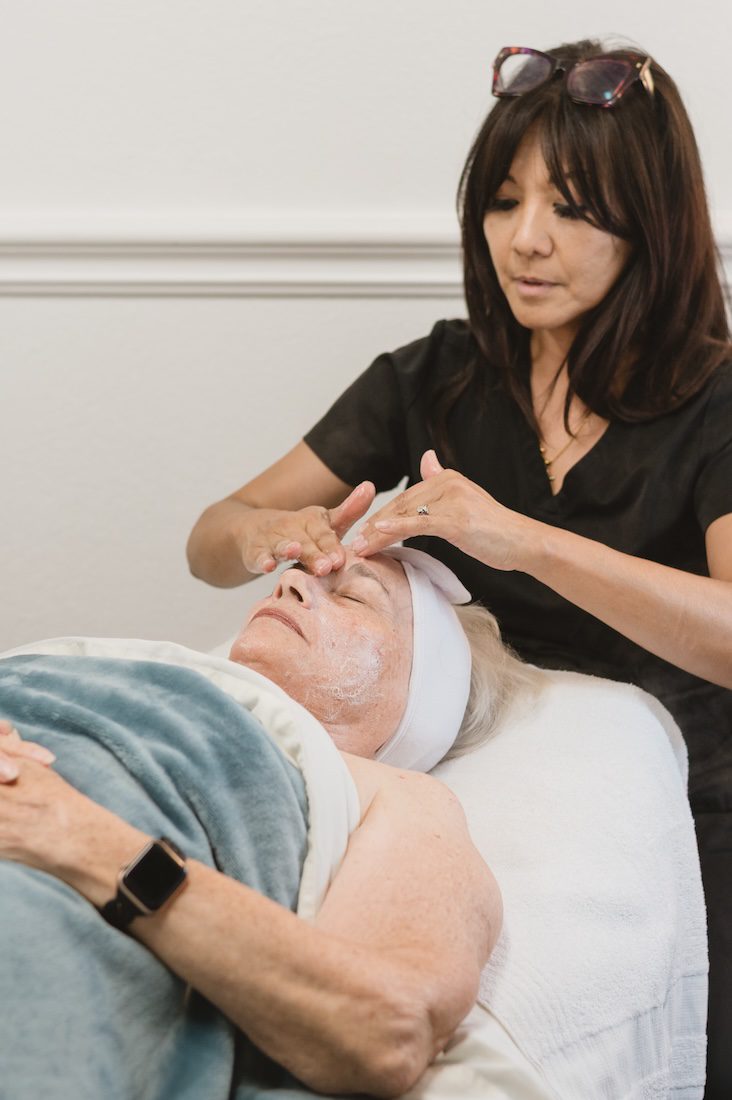
esthetician Monina Wright of Moderne Beauty giving a facial to a client in Willow Glen, California by Bay ARea Photographer Jen Vazquez
Website designer and former makeup artist Kim Baker Gomez at The Sunlight Space in Los Altos, California by Bay ARea Photographer Jen Vazquez
Annabell Lindo of ShiftWell slicing lemons detail shot at The Sunlight Space in Los Altos California by Jen Vazquez Media
Makeup Artist and beauty coach Susan Talamantes at the Sunlight Space studio in Los Altos, California by Bay Area Brand Photographer Jen Vazquez

What to Do After Receiving Your Professional Brand Photos

You’ve just received your professional brand photos—congrats! These images are more than just pretty pictures; they’re powerful tools for elevating your business. Now, let’s make the most out of them! Here’s a step-by-step guide to using your brand photos to boost your online presence, attract clients, and strengthen your brand.

1. Add Them to Your Website

Your website is your digital storefront, so let your brand photos shine there first!

  • Homepage: Update your header image, about section, or hero banner with eye-catching photos that represent your brand’s vibe.
  • About Page: Use personable, relatable shots to introduce yourself and your team.
  • Services Page: Add images that illustrate your offerings in action or behind-the-scenes moments.
  • Testimonials Section: Pair testimonials with brand photos to create a cohesive, polished look.

2. Level Up Your Social Media Presence

Your brand photos are perfect for creating a professional and consistent look across social platforms.

  • Profile Picture & Cover Photo: Use a strong headshot or brand-related image for a cohesive first impression.
  • Content Creation: Pair your brand photos with valuable captions for posts, reels, or carousels. Think about sharing behind-the-scenes shots with tips about your business or a fun fact about you!
  • Stories & Highlights: Keep your brand present by using photos in Instagram highlights or daily stories.

3. Refresh Your Marketing Materials

From print to digital, your brand photos can help tie everything together.

  • Business Cards: A professional headshot or brand-related image adds a modern, personal touch.
  • Email Signatures: Include your photo in your email footer to humanize your communication.
  • Brochures & Flyers: Incorporate images that resonate with your audience and highlight your services.

4. Design Eye-Catching Lead Magnets

If you’re using a freebie or downloadable to attract leads, your brand photos can elevate its appeal.

  • E-books or Guides: Add your photos to the cover, introduction page, and throughout the content to align the visuals with your brand.
  • Workbooks or Templates: Use images to make the materials more visually engaging.

Landing Pages: Include your brand photos to personalize the lead magnet’s sign-up page.

Brand Photos for an Executive and Leadership coach, Corporate Trainer/Facilitator, and Speaker Kristen Brun by Bay Area California Jen Vazquez Photography

Need Photos?

We’d love to help you capture photos that not only let’s your brand stand out and help with visibility, but also that you love and that helps you book more clients!

Click Here

5. Boost Your Pinterest Strategy

Pinterest is a visual search engine, so your brand photos are perfect for driving traffic to your content.


  • Create Pins: Use your photos as part of your pin designs for blog posts, services, or freebies.


  • Profile Branding: Update your profile photo and banner with images that reflect your business.


  • Pin Graphics: Combine your photos with text overlays to share helpful tips, quotes, or service offerings.


6. Use Them in Ads (If Applicable)

While you don’t focus on Pinterest ads, your photos can work for other platforms.


  • Social Media Ads: Use photos for Facebook or Instagram ads to showcase your products or services.


  • Google Display Ads: Eye-catching photos can grab attention in a competitive digital space.


7. Enhance Your Blog Posts

Professional brand photos add a personal touch to your blog content.


  • Feature Images: Use photos to create a consistent look for your blog headers.


  • In-Content Photos: Add images that illustrate the topic or provide a behind-the-scenes perspective.


  • Author Bio Section: Include a headshot for a relatable, professional touch.


8. Create Consistent Branding for Your Presentations

Whether you’re presenting to clients, hosting webinars, or speaking at events, brand photos can elevate your materials.


  • Slide Decks: Use photos as slide backgrounds or in sections that introduce you and your business.


  • Workbooks or Worksheets: Add images to make your training materials more polished.


9. Update Online Directories or Professional Listings

If you’re featured on directories like LinkedIn, Google My Business, or niche-specific sites, use your updated photos to stand out and keep your profiles fresh.

10. Repurpose, Repurpose, Repurpose!

One of the best things about professional brand photos is how versatile they are.

  • Seasonal Content: Save some images to use in specific seasons or for campaigns.
  • Collaborations: Provide photos to collaborators or partners for marketing joint projects.
  • Thank You Notes or Holiday Cards: Incorporate them into your client communications.

Final Thoughts

Professional brand photos are an investment in your business, and the key to maximizing that investment is using them strategically. From your website to your social media and marketing materials, these images can help you make a lasting impression and connect with your ideal clients.

Got your brand photos but not sure where to start? Let’s chat! I can help you craft a strategy to get the most out of your stunning new visuals.