Pinterest’s 2026 Color Palette + How Service Providers Can Use These Colors in Their Marketing

Pinterest’s 2026 Color Palette + How Service Providers Can Use These Colors in Their Marketing<br />
by Jen Vazquez Media

Pinterest’s 2026 Color Palette + How Service Providers Can Use These Colors in Their Marketing
Okay, first things first: this is not a “pick a color and panic” post.
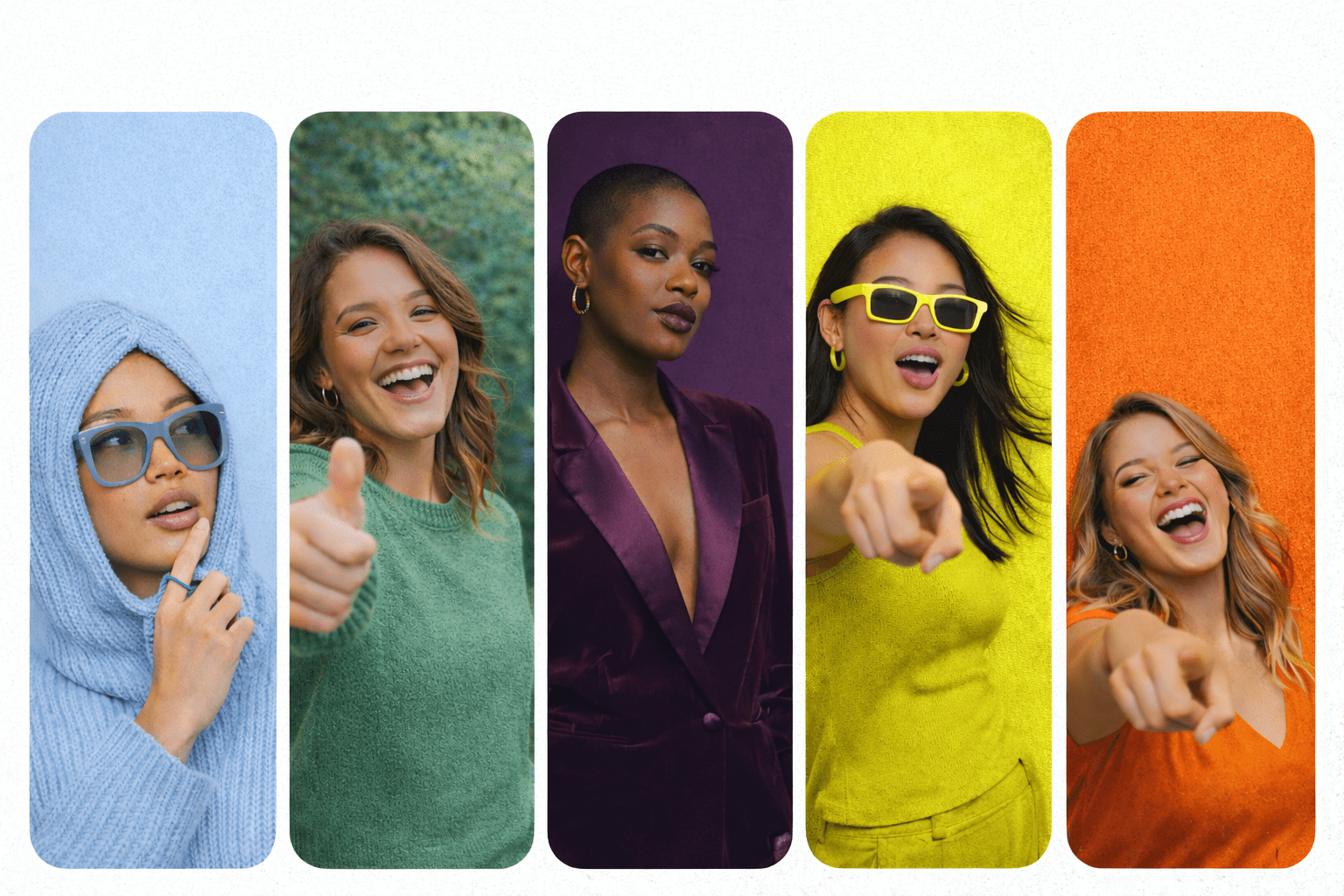
The 2026 Pinterest Palette™ is here, and it’s playful, bold, moody, fresh, and just cheeky enough to make your marketing feel alive again.

And no—you don’t need to rebrand your whole business or repaint your office walls.
You do get to borrow the vibe.

Let’s talk about what these colors actually mean and how service providers can use them without adding more work to their plates. Because we like fun… not chaos.

What Is the Pinterest Palette (and Why It Matters)?

Every year, Pinterest releases a color forecast based on real search data. Not guesses. Not trends pulled out of thin air. Actual things people are saving, searching, and planning for.

Which means this palette isn’t just pretty—it’s predictive.

Translation for service providers:
These colors reflect what your future clients already like, even if they can’t name it yet.

The 2026 Colors (a Very Jen Breakdown)

Cool Blue

Think calm, clean, icy-in-the-best-way.
This color is giving clarity, confidence, and “I’ve got this handled.”

Use it if you want to:

  • Feel trustworthy and grounded
  • Create breathing room in your visuals
  • Balance out louder brand colors

Perfect for:
Website sections, Pinterest pin backgrounds, quote graphics, educational content.

Pinterest’s 2026 Color Palette by Jen Vazquez Media

Jade

Earthy but elevated. Soft but strong.
Jade feels intentional. Like you know who you are and don’t need to shout.

Use it if you want to:

  • Show growth, stability, or transformation
  • Add warmth without going neutral
  • Feel luxe without feeling stiff

Perfect for:
Lifestyle photos, service graphics, Instagram stories, brand photography accents.

Pinterest’s 2026 Color Palette by Jen Vazquez Media

Plum Noir

Moody. Rich. A little mysterious.
This is “I’m the expert” energy.

Use it if you want to:

  • Signal depth and experience
  • Add drama (the good kind)
  • Stand out in a sea of beige

Perfect for:
Headers, callouts, high-end offers, launch visuals, text overlays.

Pinterest’s 2026 Color Palette by Jen Vazquez Media

Wasabi

Bold. Electric. Not here to play small.
This color is a jolt—and that’s the point.

Use it if you want to:

  • Grab attention fast
  • Highlight CTAs or buttons
  • Add personality without being loud everywhere

Perfect for:
Buttons, arrows, underlines, stickers, micro-accents.

Pinterest’s 2026 Color Palette by Jen Vazquez Media

Persimmon

Warm. Joyful. Confident.
This color feels like momentum.

Use it if you want to:

  • Feel approachable and human
  • Add energy to your content
  • Nudge people to take action

Perfect for:
Offers, promo graphics, storytelling posts, lead magnets.

Pinterest’s 2026 Color Palette by Jen Vazquez Media

How Service Providers Can Use This (Without Doing Too Much)

Here’s the secret:
You don’t use all five. You pick one or two and sprinkle.

Try this instead:

  • Update your Pinterest pin templates with one palette color
  • Add a new accent color to Canva and use it for CTAs
  • Choose one shade for a seasonal content batch
  • Let it guide your brand shoot styling or flat lays
  • Use it as a filter when choosing stock or B-roll

This is about alignment, not perfection.

Why This Works So Well on Pinterest (Specifically)

Pinterest users are planners. They’re future-focused.
And these colors are literally based on what they’re planning for next.

When your visuals quietly match what they’re already drawn to:

  • Your pins blend in just enough to belong
  • And stand out just enough to get clicked

That’s the sweet spot.

Final Pep Talk (Because You Know I Can’t Help Myself)

You don’t need to chase trends.
You don’t need to redo your brand.
And you definitely don’t need to overthink this.

Use the palette as a tool, not a rule.
Borrow the energy. Make it yours. Have a little fun with it.

Marketing gets to feel good. 💖

Want the Official Breakdown?

Here’s Pinterest’s full announcement with all the visuals and data.

And if you want help turning trends like this into pins that actually bring in traffic and leads… you know where to find me. 😉
Gen Z on Pinterest: How They’re Taking Back Their Taste (and What It Means for Brands)

Gen Z on Pinterest: How They’re Taking Back Their Taste (and What It Means for Brands) by Jen Vazquez Media

Gen Z on Pinterest: How They’re Taking Back Their Taste (and What It Means for Brands)

Pinterest just dropped some cool insights on how Gen Z is using the platform to rediscover their taste in a world full of AI and copy-cat trends. This isn’t just social media talk — it’s a real shift in how young people explore ideas, define themselves, and make decisions online. 

Why This Matters

Gen Z — that group born roughly between 1996 and 2010 — is now the biggest group on Pinterest, and their habits are shaping how the platform works and how brands should show up. (Pinterest)

These young folks grew up with TikTok, Instagram, AI tools, and tons of algorithm feeds telling them what to like. But guess what? They’re kind of over it. They want real inspiration, not automatic suggestions or “everyone’s doing this” content. (Social Media Today)

1. Gen Z Is Rejecting the AI Feed Loop

Algorithms and AI tools tell you what to watch, wear, or want — but that can blur individual taste. Many Gen Z users say they don’t even know what they like anymore after just following all that automated “must-see” stuff. (Pinterest)

So they’re choosing a different path: they want content that helps them explore who they are, not what AI thinks they should be into. (Social Media Today)

2. Identity Through Aesthetics (Not Trends)

Gen Z isn’t into one-size-fits-all trends anymore. Instead, they’re:

  • Making tiny, niche aesthetics based on mood or vibe
  • Mixing styles that feel true to them
  • Avoiding “trend burnout” by putting their own spin on things

That means Pinterest boards that feel personal — like “Cool Blue,” “Dark Academia,” or whatever unique mashup they dream up next. (Pinterest)

They aren’t just scrolling. They’re actively curating their identity. That’s powerful. (Diary Directory)

3. Visual-First = Better Decision Making

Gen Z grew up with screens in their hands, so they don’t want long blocks of text. They want visuals — fast.

Pinterest is visual first, meaning it helps people see, compare, and feel an idea before they commit. That’s part of why 69% of Gen Z say imagery helps more than text or reviews when making decisions. (Pinterest)

4. Safe Space for Exploration

Unlike some platforms that feel loud, judgmental, or purely engagement-driven, Gen Z describes Pinterest as less performative and more intentional. They feel comfortable trying ideas, crafting boards, and changing their minds — without pressure. (Pinterest)

So instead of scrolling endlessly, they’re exploring at their own pace — and that’s refreshing. It’s anti-doom scroll, if you think about it. (Pinterest)

5. What This Means for Brands

If you’re creating on Pinterest, this shift is a big deal:

  • Be part of their story: Gen Z isn’t there for ads that interrupt. They want inspiration that fits their taste journey. (Pinterest)
  • Support individuality: Pins that help users make choices feel more meaningful than ones that push “trending” products. (Pinterest)
  • Think visual first: Strong visuals help Gen Z decide what fits their vibe faster. (Social Media Today)

At the end of the day, Gen Z on Pinterest isn’t just browsing — they’re finding themselves through what they save and explore. That’s pure gold if you’re trying to connect in a real way.

📌 DON’T FORGET TO PIN IT!

Your Pinterest Isn’t Broken: Why Saves Don’t Turn Into Clicks (And How to Fix It)

310 | Your Pinterest Isn’t Broken: Why Saves Don’t Turn Into Clicks (And How to Fix It) by Jen Vazquez Media

Your Pinterest Isn’t Broken: Why Saves Don’t Turn Into Clicks (And How to Fix It)

If your Pins are getting saved but not clicked — or clicked but not booked — you’re not failing. You’re just stuck in one of the most confusing stages of Pinterest growth.

On paper, everything looks like it’s working. The saves are there. The topic is solid. The advice is helpful. And yet… nothing is moving forward.

Hey, I’m Jen Vazquez. I help service providers use Pinterest in a way that actually leads to clients, not just pretty metrics. And I want to clear something up right away.

Saves are not the problem.

A save usually means:
• This is useful
• I want to come back to this
• This feels relevant to me

Pinterest needs saves to learn who to show your content to. So if you’re getting saved, that’s not failure. That’s step one.

Where things usually stall is what happens next.

Disclosure: This post contains affiliate links. If you click and make a purchase, I may earn a commission at no extra cost to you.

Why Saves Matter (Even If They Feel Useless Right Now)

Saves tell Pinterest who your content is for. They’re a signal that your Pin is landing with the right people — even if those people aren’t ready to act yet.

That’s important.

But saves alone don’t create momentum. They don’t book calls. They don’t grow your list. And they don’t turn into clients unless something else is happening.

That “something else” is confidence.

What Actually Makes Someone Click on a Pin

Clicks happen when someone feels confident:

  • confident you understand their problem
  • confident you’re credibleconfident what you’re offering is worth their time

And that confidence doesn’t come from information alone.

It comes from trust.

This is where a lot of Pinterest strategies quietly break down. The keywords are fine. The topic is solid. The advice is helpful.

But everything feels a little generic.

Stock photos.
Faceless graphics.
Polished visuals that don’t tell you who’s actually behind the content.

So people save it… but hesitate to click. Or they click… but don’t take the next step.

Not because your strategy is wrong — but because the connection isn’t strong enough yet.

Your Pinterest Isn’t Broken: Why Saves Don’t Turn Into Clicks (And How to Fix It) on Marketing Strategy Academy Podcast with Jen Vazquez

The Real Role of Trust on Pinterest

This is what everyone talks about when they mention the know, like, and trust process.

And here’s the honest truth: nobody is going to know, like, and trust you from one Pin. That’s just not how this works.

Pinterest is a long game.

The goal isn’t just visibility. It’s helping the right people feel comfortable enough to move forward over time. That happens when your content consistently shows:
• who you are
• what you stand for
• how you think
• who you’re actually for

When trust and visibility work together, clicks start to feel easier — and conversions stop feeling random.

How to Build Pinterest Content That Leads Somewhere

If you want to understand how strategy, trust, and visibility actually work together, this is exactly what we walk through at the Creative Marketing Summit.

It’s a free online event happening at the end of February, and it’s designed for service providers who want marketing that leads somewhere — not just content that looks good.

You can grab your free ticket at CreativeMarketingSummit.com.

Thanks for hanging out with me today. You crushed it just by showing up for your business.

📌 DON’T FORGET TO PIN IT!

What It’s Really Like to Co-Host a Podcast + Launch a Program Together (Lessons for Female Founders)

What It’s Really Like to Co-Host a Podcast + Launch a Program Together (Lessons for Female Founders) on Marketing Duo Podcast

One Year In: Why We Started the Marketing Duo Podcast

When we hit the one-year mark of the Marketing Duo podcast, we had to pause and celebrate a little. A year in, only four missed episodes, two separate businesses, two separate podcasts… and somehow we kept this one going.

We didn’t start the podcast because we needed another thing on our plates. We started it because we wanted a space to talk through marketing in a real, conversational way — and because collaboration sounded more fun than doing everything alone.

What surprised us most is how quickly the podcast turned into something bigger. The conversations led to ideas. The ideas turned into Quiet Growth. And suddenly, this “fun project” became a real program with real results for real people.

That evolution didn’t happen by accident.

Why Podcasting With a Partner Felt Easier (Not Harder)

One of the biggest benefits of co-hosting is simple: you’re not carrying the full weight alone.

When you run a solo podcast, everything sits on your shoulders — content ideas, planning, recording, publishing, promotion. With a partner, that mental load is shared. You’re both bringing ideas. You’re both invested. And you’re motivating each other when energy dips.

We were worried at first that collaboration might make content harder. Instead, it made it lighter. We keep a shared list of ideas (there are a lot of them), and we never struggle to find something to talk about.

The key? We both like to talk, we both like problem-solving, and we both come into conversations looking for solutions — not complaints.

The Capacity Reality Check No One Talks About

Here’s the honest part: launching a brand-new program while running a podcast is a lot.

During the Quiet Growth launch, things slipped. We missed a few episodes. Life happened. Health stuff popped up. Client work took priority. And that was okay.

Every business owner has a capacity — and that capacity shifts. The mistake isn’t hitting a limit. The mistake is pretending you don’t have one.

Instead of beating ourselves up, we treated that season as a planned pause. Consistency matters, but so does sustainability. Long-term visibility only works if you can keep showing up without burning out.

What It’s Really Like to Co-Host a Podcast + Launch a Program Together (Lessons for Female Founders) on Marketing Duo Podcast

What Makes a Partnership Actually Work

If there’s one thing we’d stress to anyone thinking about a collaboration, it’s this: alignment matters more than hype.

We serve similar audiences. Mostly female service providers. Different niches, different strengths — but the same core people. That overlap makes the work feel worth the time.

We also talked early about roles, responsibilities, and tools. Who owns what. What gets outsourced. What gets shared. Those conversations changed over time, but having them upfront prevented resentment later.

And maybe most important: trust. If something feels off, we can talk about it. If one of us needs rest, the other steps in with grace. That kind of safety doesn’t happen overnight — it’s built through time, small collaborations, and honest communication.

Start Smaller Than You Think

We didn’t jump straight into a joint program.

Before Quiet Growth, we tested things. Guest trainings. Free workshops. Affiliate partnerships. Showing up in each other’s audiences in low-risk ways.

Those baby steps mattered. They built confidence, proof, and trust — without pressure.

If you’re considering a partnership, don’t skip this part. Try a short series. A co-hosted workshop. A shared offer. Let the relationship earn its way into something bigger.

Scheduling, Systems + Making It Feel Doable

Our systems evolved as we went. Monthly marathon recording sessions didn’t work. Weekly touchpoints did.

Blocking time on the calendar — even when it moved — helped us stay consistent. Recording multiple episodes in one sitting helped reduce pressure. Doing things ourselves first helped us later outsource with clarity.

And we agreed upfront: this didn’t have to be perfect. It just had to be sustainable.

That mindset saved us more than once.

Why We’d Do It All Again

This podcast didn’t just create content. It created connection, confidence, and a new income stream. It opened doors to new clients, new ideas, and deeper collaboration.

Business can be lonely. Doing it with someone you trust makes it lighter — even when it’s hard.

If you’re thinking about a podcast, a partnership, or a collaboration of any kind, the biggest takeaway is this: it should feel good and make sense for your business.

When it does both, that’s where the magic happens.

📌 DON’T FORGET TO PIN IT!

Pinterest Tips That Actually Work in 2026 (and What to Stop Doing)

If Pinterest feels slower than it used to — or you’re doing all the “right” things and still not seeing traction — you’re not alone.

Pinterest has changed. And it will keep changing. That’s just how platforms evolve. The good news? Once you understand how it’s changed, everything gets a whole lot simpler.

I’m Jen. I help service providers use Pinterest in a calm, realistic way that fits real life — not hustle culture. Today we’re cutting through the noise and talking about what actually works on Pinterest right now, plus what to stop doing so you don’t burn yourself out for no reason.

Over the past year, Pinterest has shifted in a big way. Not scary. More like… clarity. Most frustration I see comes from using advice that worked years ago but doesn’t line up with how Pinterest works today. So let’s reset and focus on what matters now.

Pinterest Tips That Actually Work in 2026 (and What to Stop Doing) on Marketing Strategy Academy with Jen Vazquez

Pinterest Tips That Actually Work in 2026 (and What to Stop Doing)

If Pinterest feels slower than it used to — or you’re doing all the “right” things and still not seeing traction — you’re not alone.

Pinterest has changed. And it will keep changing. That’s just how platforms evolve. The good news? Once you understand how it’s changed, everything gets a whole lot simpler.

I’m Jen. I help service providers use Pinterest in a calm, realistic way that fits real life — not hustle culture. Today we’re cutting through the noise and talking about what actually works on Pinterest right now, plus what to stop doing so you don’t burn yourself out for no reason.

Over the past year, Pinterest has undergone a significant shift. Not scary. More like… clarity. The most frustration I see comes from using advice that worked years ago but doesn’t align with how Pinterest works today. So let’s reset and focus on what matters now.

Stop Treating Pinterest Like Social Media

Pinterest is not Instagram.

Posting more does not equal better results. Posting with purpose does.

What to stop doing:

  • Posting just to post
  • Uploading random graphics with no clear topic
  • Treating Pinterest like a social feed with links slapped on

What works instead is clarity.

Pinterest wants to understand:

  • Who is this pin for?
  • What problem does it solve?
  • Where does it send someone next?

If those three things are clear, Pinterest can actually place your content in front of the right people. Clear topics. Clear visuals. Clear intent. That’s it.

Fresh Pins Still Matter — Just Not Like They Used To

Yes, fresh pins still matter. No, volume is not the goal anymore.

Fresh now means:

  • A new image or layout
  • One clear topic
  • A useful idea

It does not mean logging into Pinterest every single day. You can batch and schedule in advance and still have pins going out daily. That’s actually the most strategic way to save time and get results.

It also doesn’t mean creating constant brand-new content. One of the best strategies is creating new pins for content that’s already working.

Every time I post, I look at my top five to ten blog posts or products in Google Analytics. Those get new pins. I also create pins for whatever new content is going out that week.

Old content + new pins is where the magic is. No trend chasing required.

Saves Matter More Than Clicks

This one is a big mindset shift.

Pinterest is watching saves. Not just clicks.

A save tells Pinterest, “This is useful. This is worth showing again.” If someone saves your pin but doesn’t click right away, that is not a failure. That’s Pinterest learning who to show it to next.

Focus on:

  • Step-by-step lists
  • Clear takeaways
  • Teaching pins

If people save it or click it, you’re doing it right.

Grab the Free Pinterest Resources Vault

If you want simple, no-fluff help with Pinterest, the Resources Vault is packed with free guides and tools to help you get clear, get organized, and stop guessing what to do next.

Pinterest Tips That Actually Work in 2026 (and What to Stop Doing)

Want Pinterest to Feel Simpler Every Week?

If you don’t want to guess what to post, when to post, or whether you’re doing it “right,” The Club is a membership where I help you keep Pinterest simple and consistent. You’ll get clear strategy, easy templates, and ongoing support so Pinterest fits into your real life — not the other way around.

Stop Overthinking Keywords

Keywords are still the most important part of Pinterest success. But they do not need to be complicated.

Use natural phrases. Clear language. The exact words your ideal client would type into a search bar.

An easy way to find keywords? Ask. Put a question box on Instagram Stories and ask, “If you were looking for this, what would you type into Google or Pinterest?”

Simple always wins.

Don’t be cute. Be clear.

“Pinterest tips for service providers” will always outperform something vague or clever. Say exactly what it is. Word for word.

Consistency Beats Intensity

Pinterest rewards steady behavior.

That might look like:

  • One blog a week
  • Five to seven pins a week
  • Staying on the same topic over time

What doesn’t work is a burst of energy followed by disappearing and starting over.

You don’t need to hustle. You need a plan. Pinterest loves rhythm.

And next week, we’re talking about what Pinterest wants from your content in January and how it can work for you all year long.

📌 DON’T FORGET TO PIN IT!

Pinterest Tips That Actually Work in 2026 (and What to Stop Doing)

How to Get More YouTube Traffic Using Pinterest

How to Get More YouTube Traffic Using Pinterest by Jen Vazquez on the Marketing Strategy Academy Podcast

How to Get More YouTube Traffic Using Pinterest

Pinterest might not be the first place you think of for YouTube growth, but honestly, it should be. If you want more views without posting every single day, Pinterest is doing some heavy lifting right now—and it’s only getting better.

I’m Jen, and I help service providers build simple marketing systems that work in the background so business doesn’t take over life. Today, I’m breaking down how Pinterest can send steady traffic to your YouTube videos, even if your channel is small.

Pinterest just crossed 600 million monthly users. That’s not a typo. And the best part? People go there to search, not scroll. That means your content doesn’t disappear after 24 hours. It can keep showing up for months—or even years.

Let’s walk through the easy, Pinterest-friendly way to boost your video views.

>

Why Pinterest Works So Well for YouTube

Pinterest is not social media in the way Instagram or TikTok are. It’s a visual search engine. People open Pinterest with intent. They’re looking for answers, ideas, and how-tos.

When your video shows up in search, it reaches people who already want that topic. That’s why Pinterest traffic tends to be calmer, steadier, and more consistent over time.

If you’re tired of chasing trends or feeling pressure to post constantly, this matters.

Tip One: Skip Direct Sharing from YouTube

Directly sharing a YouTube link to Pinterest usually gives you a small landscape preview. That tiny 16×9 image gets lost fast.

Instead, create a long vertical pin. Think Pinterest first, YouTube second. Vertical pins take up more space, grab attention, and perform better in search.

You’re not changing your video. You’re just packaging it in a way Pinterest understands.

Tip Two: Add a Play Button That Pops

People need to instantly know they’re clicking through to a video. A simple red triangle play button does that job fast.

Place it somewhere visible on the pin. This small visual cue increases clicks because it removes confusion. People know exactly what they’re getting.

If they don’t realize it’s a video and bounce back quickly, Pinterest reads that as low value. Clear signals help your pin perform better.

Tip Three: Use Simple Text Overlay (and Say “Video”)

Don’t just upload a screenshot of your YouTube thumbnail. Keep it clean and clear.

Add short text like:

  • Pinterest Tips (Video)
  • Brand Photos Guide (Video)
  • Client Workflow Tips (Video)

Yes, actually using the word “video” helps. It sets expectations and attracts people who want to watch—not just read.

Clear text gets more clicks. Always.

Make It Even Easier

Want your YouTube videos to bring in steady views without adding more to your weekly to-do list?

My Pinterest management services take care of the whole system — keywords, pin design, weekly posting, and analytics — so your videos keep getting found long after you hit publish.

This is about working smarter, not harder.

Tip Four: Write Descriptions Like a Human

Pinterest is powered by keywords, but that doesn’t mean sounding robotic.

Write descriptions using words people actually type into search:
“This video shows you how to fix your workflow so you can save time and get more leads.”

Short. Real. Helpful. No clickbait.  Pinterest rewards clarity, not tricks.

If you want AI to help, check this out!

Tip Five: Upload Short Video Pins as Previews

Short video pins are perfect previews for your YouTube content.

If you already create Shorts or Reels, you’re ahead. Upload those vertical clips to Pinterest, add text overlay, and include a small CTA like “Watch the full video on YouTube.”

Each new pin gives your content another chance to spike in views. Fresh pins = fresh reach.

Thanks for hanging out with me today. Coming next week, we’re talking all about how to use brand photos to bring in more clients in 2026. You don’t want to miss it.

📌 DON’T FORGET TO PIN IT!