
How to Build a Pinterest Keyword Strategy That Actually Works for Service Providers

How to Build a Pinterest Keyword Strategy That Actually Works for Service Providers<br />
 by Jen Vazquez Media

How to Build a Pinterest Keyword Strategy That Actually Works for Service Providers

If you’re a service-based business owner, here’s the truth: Pinterest can be your secret weapon, but only if you’re using the right keywords. Unlike Instagram or TikTok, Pinterest isn’t a social platform—it’s a visual search engine. That means your dream clients are searching for exactly what you offer. The question is—are you showing up in those searches?

Why Pinterest SEO Matters for Service Providers

Pinterest isn’t just for recipes and DIY inspo. It’s a powerhouse search engine where people are actively planning and looking for services—yes, even local ones. As a coach, photographer, or wedding pro, this is huge. Your content can drive traffic not just for weeks, but for years. I still get leads today from a pin I created ten years ago. That’s the magic of Pinterest SEO and keywords—evergreen content that works on autopilot.

What Long-Tail Keywords Actually Do for You

Short-tail keywords like “Pinterest marketing” are crazy competitive. But long-tail keywords—like “Pinterest marketing tips for wedding photographers”—narrow your reach to exactly who you want to work with. They have less competition, attract clients closer to booking, and they even boost your visibility on Google since Pinterest ranks so well there.

How to Find the Right Keywords Without Guessing

Start by searching the way your client would:

  • Use the search bar and jot down Pinterest’s auto-suggest results.
  • Pay attention to those colorful “search bubbles” (keyword gold!).
  • Check Pinterest Trends (trends.pinterest.com) to see what’s gaining traction.

And here’s a biggie—ditch your industry lingo. Clients aren’t searching for “eSessions,” they’re searching for “engagement photos San Jose.” Speak their language, not yours.

Build a Keyword Bank to Save Your Sanity

Once you gather ideas, build a keyword bank. This could be a simple doc where you list your core topics (like coaching, brand photography, marketing workflows, or AI) and all the variations you find in searches. A keyword bank means no second-guessing when it’s time to pin—you just grab what you need and keep moving.

Want to make it even easier? Grab my free keyword builder inside the Pinterest Vault.

Turn Pinterest Into Your Lead Machine

Stop guessing what to post on Pinterest and start seeing real results. With Pinfluence, I’ll optimize your profile, boards, and keywords so your content works on autopilot. Think of it as a power clean for your Pinterest—done-for-you SEO, a keyword bank you can actually use, and a strategy that attracts dream clients month after month.

Where to Use Keywords on Pinterest

Keywords aren’t just for pin titles and descriptions (though they’re essential there). Use them in:

  • Your board titles and descriptions
  • Your Pinterest profile (yes—even your name!)
  • The file name of your Canva graphics before uploading
    Basically, if it’s text, it’s searchable on Pinterest. Use it wisely, but keep it natural—remember, you’re writing for humans, not robots.

Make Pinterest Work for You on Autopilot

When you create a keyword-rich strategy upfront, you don’t need to overthink every single pin. Your content consistently appears in searches, generating leads while you focus on serving your clients. That’s how you market smarter, not harder.

So the next time you sit down to pin, ask yourself: Am I showing up for the keywords my dream clients are searching? If the answer’s no, let’s fix that. Check out Pinfluence here, and let’s turn your Pinterest into a lead-generating machine.

DON’T FORGET TO PIN IT!

Long-Tail Keywords Win How to Build a Pinterest Keyword Strategy That Actually Works for Service Providers | Jen Vazquez
Evergreen Pin Power How to Build a Pinterest Keyword Strategy That Actually Works for Service Providers | Jen Vazquez
Pinterest for Service Pros How to Build a Pinterest Keyword Strategy That Actually Works for Service Providers on Marketing Strategy Academy with Jen Vazquez
Pinterest SEO Secrets How to Build a Pinterest Keyword Strategy That Actually Works for Service Providers |  Jen Vazquez
Pinterest Keyword Bank How to Build a Pinterest Keyword Strategy That Actually Works for Service Providers | Jen Vazquez

A Super Simple Marketing Workflow that Includes Pinterest

A Super Simple Marketing Workflow that Includes Pinterest by Jen Vazquez Media

A Super Simple Marketing Workflow that Includes Pinterest

I wrote this article for the Pinterest Business Community as one of their Pinterest Pioneers.  I hope that you take this opportunity to join the community — there is so much information and help there and it’s an amazing tool!

Are you tired of feeling like a chicken with its head cut off when it comes to managing your marketing tasks? Well, fear not, because I’m here to share some tips on creating a workflow that will save you time and keep you sane.

We all know that marketing can be overwhelming, with different platforms and endless to-do lists. But with a little bit of planning and creativity, we can make it all work seamlessly. So, grab a cup of coffee, and let’s brainstorm some ideas that will make your marketing workflow not only effective but also enjoyable!

Your Business Goals Are First

Knowing your business goals is the absolute first step to creating a marketing workflow.  You really need to know what your goals are to be able to know the content you’ll create and then the workflow you’ll use.

Core Content

A main form of marketing content is typically a Blog, Youtube Video, or Podcast.  Core Content (also known as main content, cornerstone content, or long-form content).  Having core content enables you to focus on one piece of content a week and turn that into several pieces of social marketing content (of course including on Pinterest).

Social Marketing Versus Search Marketing

Of all the platforms out there.  They are either search marketing or social marketing. So which should you use and why? (heads up that a trick question as you should use a combo of both.)

Social marketing platforms are:

  • Tiktok
  • Instagram
  • Facebook

Social marketing is a hungry hungry hippo and needs to be fed often.  It’s bite-size info and it’s mostly (not totally) for nurturing your audience on there.

It’s also more personal and where people want to find out more about your beliefs, the way you speak, and what you say.  More importantly, it’s part of that know, like, and trust process potential clients typically go through wherever they start looking at your content.

As an example: They see a pin on Pinterest.  They click through to your blog (or other long-form content).  There is more trust there as what you shared resonated with them.  Then they go to Instagram and sometimes TikTok to get to know you to see if they want to work with you.

NOTE: I’ve had many many clients book me and they weren’t following me on social.  They just stalked me and finally reached out.  I’ve been doing research on my clients since 2021 through deep-dive conversations on their client journey so I can work smarter, not harder.

DownsideThe posts and all that hard work on short-form videos (SFV) don’t last very long.  From 24hrs to two weeks.

Search marketing platforms are:

  • Pinterest
  • Youtube
  • Google (your blog)

Search platforms are where people go to learn from you and for you to get new eyeballs on your content.  Search platforms are an amazing way to get found, and attract new potential clients, and your content lasts much longer than social platforms.

As an example: Some of my top performing pins each month are 6-7 years old on my photography Pinterest (I’ve been using Pinterest since 2009 for that business).  It’s embarrassing but I’ve booked clients from what I think are horrible images and my clients who book and get wedding photos are blown away.  Win Win in my book!

Downside:  Search marketing takes time and consistency to see growth.  Give your hard work on Pinterest 6 months and you’ll see growth if you are consistent with posting and your content is good.

My advice on social vs. search marketing

After years of creating content and running two businesses (not to mention working with my clients), I have found that the most advantageous way of marketing (that saves time but has a greater return on your time investment) is to pick at least one social and one search marketing platform.

Search will provide new eyeballs and traffic to your content and maybe even convert clients immediately, but Social provides that know, like, and trust to give confidence to your potential clients to reach out about your services.

How does your brain work?

Knowing your brain or your work style will help you so much when creating a marketing workflow.  It’s so easy to listen to educators who share how they do it.  But maybe they don’t have 4 children under 5 at home. Or they have a full-time job and a side hustle.

So let’s focus on YOU!  Do you like to start and finish a project in one sitting? Do you like to be creative (coming up with a blog post or idea pin content) in one sitting and then analytical in another (writing or recording the content and editing it)?

Once you know how your brain works and what you prefer, you will have a better idea of how to work and when to do each part of the content creation and ultimately the marketing workflow.  Don’t worry if you are new to marketing and don’t know.  Try multiple ways to find what works for you.

Simple Marketing Workflow that Includes Pinterest by Jen Vazquez Media

Simple Marketing Workflow

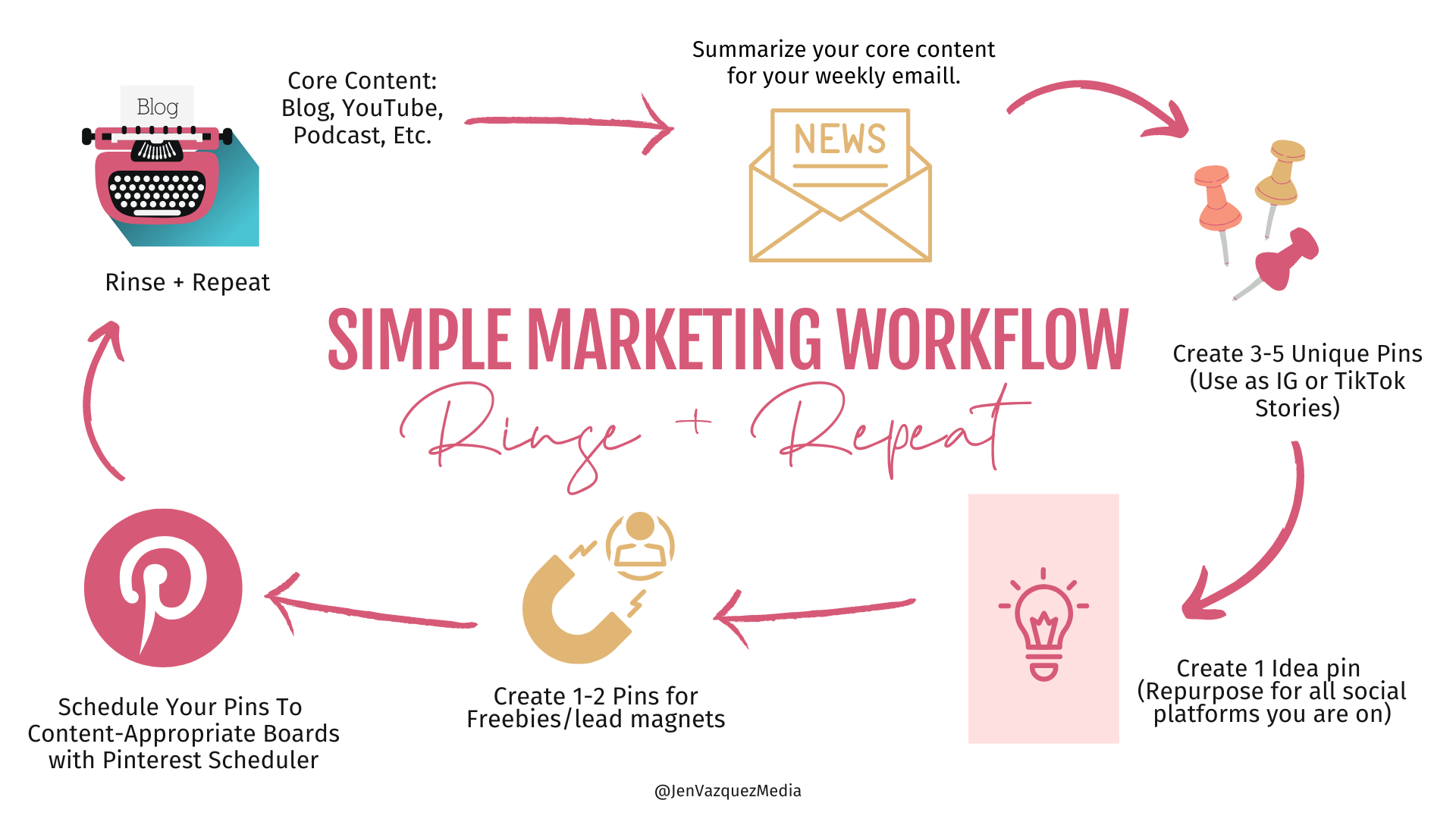
Having a marketing workflow will save you hours and hours. This way you are working smarter and not trying to reinvent the wheel.  To help, I have created a simple marketing workflow that includes Pinterest that you can try.

It’s best to try a workflow and tweak things around when you find a piece of the workflow that doesn’t work for you. Basically, make create your own.

I hope that this information has helped and I’d love for you to share it with a friend so we can continue to grow this amazing community.

Finally, I’m curious about what your workflow is.  Is it similar? Is it totally different?

Here is more information that may be helpful!

Don’t Forget to Pin It!

A Super Simple Marketing Workflow that Includes Pinterest by Jen Vazquez Media