How to Find + Use Pinterest Keywords That Actually Get Your Content Found
How to Find + Use Pinterest Keywords That Actually Get Your Content Found
The Foundational Skill Every Service Provider Needs on Pinterest
If your content isn’t showing up on Pinterest, keywords are probably why.
The good news? Pinterest actually makes keyword research easier than almost any other platform. You just have to know where to look.
Keywords are the skill that makes everything else on Pinterest actually work. Without the right keywords, your pins exist, but nobody can find them. With the right keywords, your content shows up in front of exactly the right people consistently over time.
Before we proceed, I want to ensure you’re aware of my free resource library, the Visibility Vault. It has Pinterest tools, marketing tools, a masterclass, keyword resources, and marketing templates, over 25 different tools, all free at learn.jenvazquez.com/resources. Go grab it and follow along.
Why Keywords Matter on Pinterest
Pinterest is a search engine, and like any search engine, it relies on keywords to understand what your content is about and who to show it to.
So when someone types “how to get more clients as a photographer” into Pinterest, the platform scans billions of pieces of content and decides which ones match that search.
If your content doesn’t include that language, you’re invisible for that entire search. If it does, you have a chance to show up and keep showing up for months, and oftentimes for years.
Where to Find Keywords: The Pinterest Search Bar
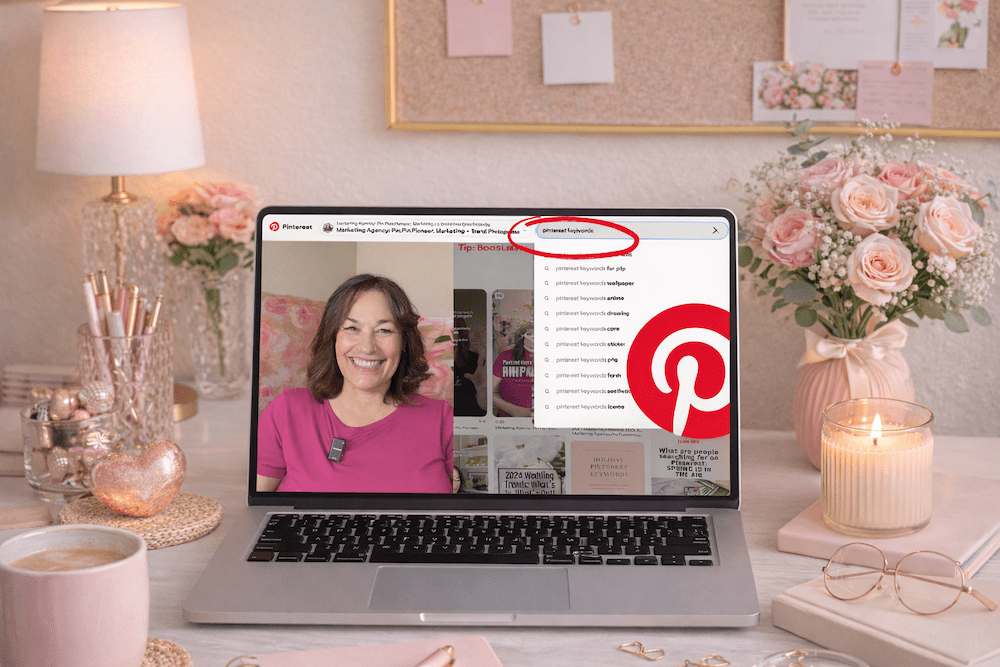
The fastest and most reliable way to find Pinterest keywords is in the Pinterest search bar itself. Here’s how:
- Go to Pinterest and click the search bar
- Type in a broad topic related to your business
- Before you even hit enter, Pinterest will start suggesting completions (just like Google)
Those suggestions are real searches that real people are typing in right now. And they’re typically listed in order of search volume.
Here’s an example. Type in “brand photography” and you might see:
- brand photography ideas for small business
- brand photography tips
- brand photography poses
- brand photography flat lay
Those are your keywords. Now hit enter and you’ll see colored tiles or bubbles appear right underneath the search bar. Those are Pinterest’s guided search categories. They show you exactly how people are narrowing their searches.
Screenshot them all. Or write them down on a keyword builder. This is free keyword research built right into the platform.
Secondary Research: Look at Performing Pins
Find a pin in your niche that is performing well. High saves, good engagement, and lots of outbound clicks are what I look at.
Read the title and description carefully. What words are they using? What phrases keep showing up?
This isn’t about copying. It’s about understanding what language is already working so you can use it authentically in your own content.
If you’ve been posting nonstop and still wondering “where are the clients?”… you’re not alone.
The problem isn’t your effort—it’s where you’re putting it.
Social media content fades fast.
Search-based content builds over time.
In this free live masterclass, Search vs. Social: Build a Visibility System That Brings Consistent Leads, you’ll learn how to stop chasing daily posts and start creating content that actually works for you long-term.
We’ll break down how Pinterest + SEO work together to bring in steady traffic and leads—without the constant grind.
If you’re tired of spinning your wheels and ready for a smarter, simpler way to get found… this is for you.
Where to Put Your Keywords
Finding keywords is only half of it. Placement is what activates them. Here are the 7 places your keywords need to live:
1. Your Display Name
Keywords in your name help Pinterest understand what you’re about from the jump.
2. Your Bio
Write it using the language your ideal client would search, not your job description. Their search terms are a win for you every time.
3. Board Titles
Every board title is indexed. Name boards the way your ideal client would actually type into the search bar, not the way you’d label a folder.
4. Board Descriptions
Two to three sentences per board using your keywords naturally. Think human-read paragraphs, not a list of terms stuffed together. Keyword dumping looks spammy and can hurt your ability to get found.
5. Pin Titles
This is one of the most important spots. Lead with your keyword phrase. Something like “Pinterest Marketing Tips for Service Providers: How to Get Started.”
6. Pin Descriptions
Two to four sentences. Use your primary keyword plus one or two related phrases. Write it like a human. The keywords should be clearly there, not forced.
7. The Content You Link To
If your blog post title and headings also use those keywords, Pinterest gets even more signals that your content matches the search. Everything reinforces everything else.
>> WANT ONGOING PINTEREST SUPPORT? JOIN THE CLUB <<
If you want monthly Pinterest trainings, live Q+A sessions, and a place to actually ask your keyword questions in real time, The Club is where I drop all of it. Come hang out at learn.jenvazquez.com/club.
How Much Is Too Much? Avoiding Keyword Stuffing
A common mistake is keyword stuffing, which means cramming in as many keywords as possible until the description reads like a robot wrote it.
Pinterest is smart enough to catch this, and it does not help your ranking at all.
The goal is natural language that includes your keywords intentionally. Read your pin description out loud. If it sounds weird, rewrite it. Real humans write it. Keywords support it. That’s the balance.
Local vs. Global Keywords
This is especially important for local service providers like photographers, wedding planners, coaches, or fitness pros serving a specific area.
Use both. Here’s why:
- Global keywords like “brand photography tips” reach a broad audience and can drive referrals or education sales
- Local keywords like “brand photographer San Jose” or “brand photographer Bay Area” reach people actively looking to book locally
I see a lot of local service providers using only generic keywords, and that’s not going to be enough to grow your business. I did this right from the beginning, and I think that’s what made a difference for me growing my business on Pinterest.
Local keywords also work for people who are traveling to your area. Someone in New York planning a trip to San Jose might search for a photographer in San Jose. If you’re using local keywords, you get found by people all over the world who come to your area.
Both serve a purpose. If you only use local, you’re missing out on the general searches that could really help you. Build your keyword strategy to include both. It’s your best chance at the fastest growth on Pinterest.
How Often Should You Revisit Keyword Research?
Keyword research is not a one-and-done task. Do a refresh every three to six months.
Search behavior changes. New terms emerge. What your ideal client is searching for in January might be slightly different by summer. Stay updated and keep your content compounding instead of plateauing.
Keywords are how Pinterest finds your content. Get them right, and your pins will keep working long after you publish them.
What to Learn Next
Now that you know how to build your strategy and how to use keywords, the next question I hear all the time is: how do I actually know if any of this is working?
That’s exactly what we’re covering next week. I’ll break down which Pinterest numbers actually matter, which ones are misleading, and what a healthy growth timeline really looks like so you don’t quit right before the good stuff happens.
Go introduce yourself on Pinterest, Instagram, or TikTok. I’ll be cheering you on from over here! 📣