How to Use Affiliate Links on Pinterest

How to Use Affiliate Links on Pinterest

If you prefer to watch rather than read, scroll to the bottom!

Are you interested in using affiliate marketing on Pinterest? Are you allowed to use affiliate links on Pinterest?  

And what are the best practices you should follow to make sure you’re not breaking any laws or risk your account to the shutdown because you did something that goes against Pinterest’s terms and conditions?

I’ll be talking about all that and the three ways to pin them.  

Happy You’re Here


Welcome back and if you’re new around here, I’m Jen Vazquez and I help female entrepreneurs go from overwhelm to an easy streamlined marketing strategy that includes Pinterest + repurposing content to grow their business with very little time.

Today we’re talking about using affiliate links on Pinterest.  Spoiler alert: You CAN use affiliate links on Pinterest BUT, you’ll need to be clear on the rules so you don’t get kicked off Pinterest or worse, break the law.  

There’s a lot to get to, but first I’ll talk about the three ways you can pin affiliate links onto Pinterest for marketing.

We will not be using the spray and pray that stuff you throw up on Pinterest works.

What is an affiliate link? 

An affiliate link is a unique hyperlink or other linking tools for referencing a person who is the affiliate for that company, product, or service.  Each time a person purchases via that link, you’ll get a stipend.   Amazon is one of the best-known affiliate links called Amazon Affiliate. 

Another one is rewardStyle and LIKEtoKNOW.it.  As of right now (Feb 15, 2022), they are now known as one single global brand named LTK.  

Also, Share-a-Sale which has a lot of brands that you can use affiliate links. 

NOTE: In a bit, I’ll cover how to ensure you can use affiliate links on Pinterest.

Ways to Pin Affiliate Links


There are four ways you can use affiliate links. 

The first is to go to the affiliate link and share that page directly to Pinterest.  The pin will pull the product image from that site. 

The second is to create a Pinterest pin graphic about the product and when pinning to Pinterest, use the affiliate link.  It’s a much better experience for the buyer and when it’s a better experience, they are more likely to purchase.  The key to Pinterest is to know your business goals and match it to what Pinterest wants from us.  So when creating a pin graphic remember, you want to inspire people to take something that they saw on Pinterest and use it in their everyday life. It’s even better if you share a video about how you use it in every life.

The third is to create a blog about the product or a number of products. You can do a blog each month with your favorite things.  Or you can create a blog with your best finds on Amazon.  Then on your blog you have the affiliate links.

The more expensive a product is, the better off you are using the third way to pinning affiliate links by writing a blog.  It’s so much easier to explain why you love it and give way more information about it.  Less expensive or known brands do well just by linking to a pin.

Now to the fourth way.  It’s the newest way and is really driving a lot of success for myself and my clients.

Idea Pins and the ability to link an affiliate link.

Currently, to add an affiliate link to your Idea Pin, you must be on the mobile Pinterest app. 

To create an Idea Pin on the mobile app, click on the “+” sign in the middle of the bar at the bottom of the page.

How to use Amazon affiliate links on Pinterest

Then, under “Create,” select “Idea Pin.”

From there, create and design your Idea Pin!

How to use Amazon affiliate links on Pinterest

Select the Idea Pin page that you want to add your affiliate product link to after creating the idea pin.

Add a product sticker

On the page, you want to add your affiliate link to, select the “Stickers” option in the bottom right-hand corner of the screen.

The “Pick a sticker” page will slide up. On this page, select the “product” sticker.


How to use Amazon affiliate links on Pinterest

Add your affiliate link

You can now either add a product by searching for a pin that is already on Pinterest or the “Use a link” option.  This is what I do.

In the “Add a product link bar,” add the affiliate link of the product you wish to promote and click “search” on your keyboard.

Tip: It can take a bit for the link to populate.   

How to use Amazon affiliate links on Pinterest

Next, click the product, then click “Create” in the upper right-hand corner to add the link to the product tag.

Important: Be sure to keep the tab toggled on that marks your product tag as an affiliate link or sponsored link IF it is an affiliate link. It should look like this:

This will essentially be a disclaimer to viewers that you are promoting the product using an affiliate link.  Remember you want to be transparent on Pinterest.

You can also add an additional disclosure in text or a voice over your idea pin.

How to use Amazon affiliate links on Pinterest IMG_59C441CE9775-1

You can customize your affiliate link and text on Idea Pins by color.  I suggest using a color that stands out on the color you have for the pin.

This product tag contains your affiliate link, so when someone is viewing your Idea Pin and clicks on your product tag, it will take them to the product page using your affiliate link.

Here is a few examples that I quickly created:

Pinterest’s Policy

First is the Pinterest policy to make sure that we follow those guidelines so our account doesn’t get shut down or we get sued because we haven’t followed these rules. 

In short, it says you are allowed to use affiliate marketing on Pinterest with some specific restrictions.

A few keys:  You’re not allowed to use shorteners or re directors. So what does tha mean?  you need to make it clear with the full link of the destination domain.  No hiding the affiliate partnership.

Pinterest always wants transparency and trust so that is key – that people know where they are going.

Also, it’s super important to NOT create affiliate pins repetitively or in large volumes, because this will trigger Pinterest spam policy and your account could be shut down.

You can read all of the rest of the policy HERE.

Summary!

Voila! You learned all about what affiliate links are, the four ways to use them, and the not-so sexy part of following the rules.

I hope you learned a lot and that you plan on trying affiliate links on Pinterest.  It’s just one more way to make money in your business.

The NOT Sexy Part of Affiliate Links

Now that you know HOW you can create affiliate links for Pinterest, now let’s chat about the not sexy part. 

I’m speaking of affiliate guidelines and FTC guidelines.

Not all affiliate links are allowed on Pinterest.  The ones you can’t use on Pinterest, you can typically use those links on your website. 

As business owners, we have to be thoughtful and follow the laws, terms, and policies so we don’t harm our business. 


FTC Information

The Federal Trade Commision of FTC is very serious.  You want to know when someone is talking about a product they love if they are getting paid or not.  It makes a difference.  You need to disclose on all social media and your website if you are sharing an affiliate link.  Pinterest is the same. The FTC is recommending words like sponsored promotion, paid ads, or #ad which is really short and what I use. It must be in the description of the pin. Make sure it’s not just hidden in the middle of the pin description to make sure people actually see it. I typically put mine at the end.

REMINDER:  All of this can change, so make sure you check these every 3-6 months for any changes.  

Last, you want to make sure that when you create affiliate pins for Pinterest, you comply with guidelines and regulations. 

It’s really important right now that I mentioned you should keep track of all affiliate links, the date you signed up, the commission, the rules.

You also need to check the affiliate link sites rules for Pinterest.  Then you need to check Pinterest to confirm it’s o.k. to use them.  

If not, you can still typically use them on a blog post and link the pin to your blog post instead of directly.

As an example for Rewardstyle (now called LTK), Pinterest allows those links.

If you need help with Pinterest, let’s chat! HERE.

Here is more information that may be helpful!
Don’t forget to pin it!

How to use affiliate links on Pinterest
How to use amazon affiliate links on Pinterest to make money while you sleep
How to use amazon affiliate links on Pinterest to make money while you sleep by Jen Vazquez Marketing Strategist
How to use affiliate links on Pinterest to make money while you sleep by Jen Vazquez Marketing Strategist

Blog My Simple Core Content System and How To Repurpose It!
Core content is simple. It’s content that aligns with your audience’s interests while simultaneously generating demand for your product or service.

An example, I’m a wedding photographer. So my core content in that business is education or sharing my service which helps my ideal client find me on Google or social media. 

It may be a blog of a wedding I did, featuring the city and venue (keywords) so google serves it up to couples searching for wedding vendors or venues. 

It may be wedding planning advice (how to find the best photographer, you’re engaged now what, how to pick a venue for the best images, etc).

Your core content can be a blog, Youtube video, or Podcast.  Let’s use a blog as an example.  

So after you create the blog, research the title to use the best keywords, you’ll want to repurpose to YouTube or podcast, or Instagram live. 

Then here is how you’ll repurpose. 

Here are just some ways that I repurpose for you to get the gist.  Here they are:


  • Start with a blog about your expertise 
  • create a YouTube of slideshow images
  • create a reel of behind the scenes
  • it becomes a video on Pinterest
  • video on LinkedIn
  • video on tik tok
  • video on YouTube 
  • add a video to blog
  • create an idea pin featuring the venue 
  • turn that info another reel 
  • create a IG carousel post tagging all vendors
  • create a venue guide by adding all images for that venue
  • create a carousel on bouquets and include one of the images from this wedding
  • google my business. Add a review of the venue saying how you love photographing there and add your images
  • share any of the above from time to time on stories 
  • share stories from the past (tag all vendors)
  • write a spotlight venue blog with the images from any wedding there
  • top 10 or 20 wedding of the year blog
  • anniversary IG post

That’s just a few ideas.  If you do this for each wedding and educational blog, you’ll never have to worry about creating more content.  Creating a core piece of content each week is the best to really drive traffic. And all of that content will help to get you found.

In addition, don’t forget that each piece of core content can create around 5-7 IG posts, reels, or other social media content.


If you need help with Pinterest, shoot me an email HERE.

Don’t forget to pin it!

My Simple Core Content System and How To Repurpose It!

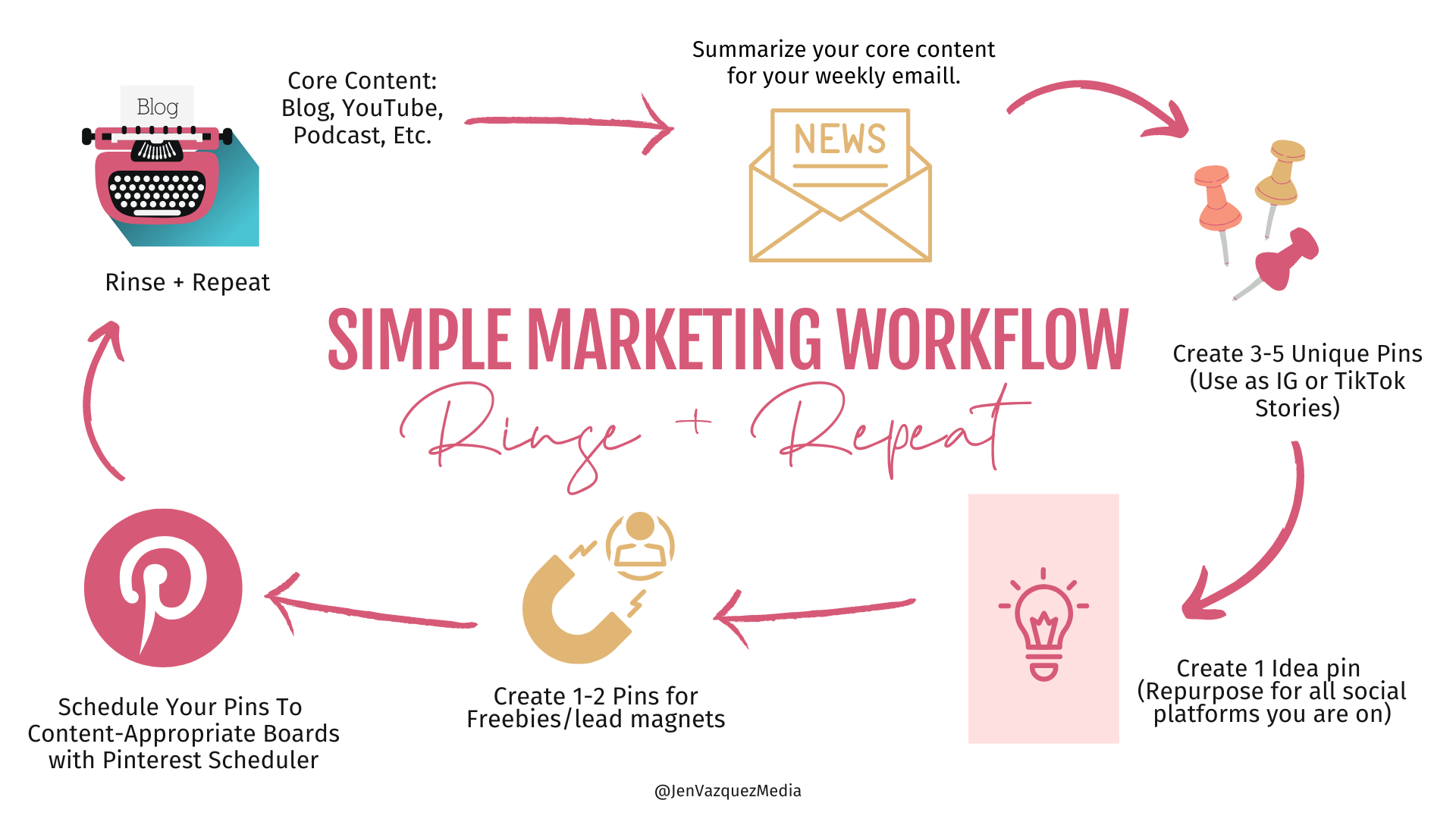

Here is more information that may be helpful!

How to make marketing easier and less time consuming in 2022

The question I get most asked from clients and potential clients is…… How to make marketing easier and less time-consuming in 2022.

Today I’ll be sharing my answer with everyone.  If you have a plan and a strategy that is focused on your business goals, it makes the whole process of marketing easier!

The plan and strategy are around your process for marketing and of course consistently, which is the hardest part of marketing.  If you are consistent, you’ll see growth in terms of analytics.

The other key to making it easier and less time-consuming is REPURPOSING.

Repurposing existing content is secret!  We’ll cover a few different ideas of how to take content that already exists, as well as, creating a process for your marketing that starts with one piece of content which turns into content for all social media platforms and more.

I excited for you to walk away from this episode with a bunch of new ideas.  AND…. a mindset to follow a process that will give you more time to spend doing what you love, instead of creating content!

If you want more in-depth help with this, I’d love to personally invite you to join my friend Kim Baker Gomez and my free masterclass discussing how to use video and repurpose it EVERYWHERE!  You can sign up for free here.

Quality vs. Quantity

When you are a solopreneur, you feel like you can never create enough content.  Every time you turn around, you need something else.  The key is to understand that you always want to start with quality content.  Quality content is what your ideal client is typing into that search bar to find your content.  

Google as well as your ideal client wants quality content.  The better your content is, the more trust you are building with that person and Google’s algorithm is very good at finding quality content and sharing it far and wide.

Consistency creates trust with the google algorithm.  It sees you consistently pumping out quality content and will drive more traffic to your blog, and ultimately your business will grow.

Consistency

Consistency is something I talk about a lot.  It’s typically the one missing piece for success on social media and online. 

Algorithms love consistently and tend to produce better engagement and your stuff gets seen more.  And people love depending upon your steady stream of content.  Oftentimes if consistency falls, so does follows and engagement.

The Most Effective Pinterest Marketing Strategy for 2022 by Jen Vazquez Pinterest Strategist

Marketing System

What makes marketing easier is if you have a system or process that you replicate week after week.  When you have a system or process, it helps you be consistent and over time you get faster at doing it.

Most of my clients come to me with inconsistent marketing because they have little to no time.  Whether they are running multiple businesses, have young kids at home, or something else, my typical ideal client has no time and is looking for help.  If they don’t outsource to me, the next best thing is to create a simple system that they follow each week. 

Here’s a peek into what that looks like for most of my clients:

Start with CORE CONTENT. 

This is typically a blog, youtube video, or podcast.  (if you want a quicker way to do a blog, I’ve recommended clients talk out loud on their cell phone voice recorder or even better use Otter.ai.  You talk and it types.  You would then obviously edit so that it’s good but this way you talk to type and it comes across far more authentic and readable.

Create Graphics/Repurposing Content.  

Once the blog writing and editing are complete.  At a different time of day, you will sit down and create graphics.  Here’s a list of the main things, but you can add many more to that.

  • Header graphic
  • Facebook/LinkedIn Graphic
  • Pinterest pin graphics which can also become IG stories
  • Idea Pin which becomes a Pinterest Video, IG carousel, IG Reel, Tik Tok, IG video post


Store these graphics in a folder on google or dropbox with the title of the blog so you can quickly find it and use graphics throughout the year.

I have mentioned above ways to repurpose the content but the key is to create all the graphics at one time.  When you are writing/editing, it’s a different part of your brain than when you are creating a graphic.  I find I save a ton of time by doing like-minded things at the same time.  

Storing them in a folder on google or dropbox helps you to find them quickly when you are in a pinch for new content on social media!  YES, you can use them again.  Almost NO ONE sees all your content in total and will notice when you use something again.  Especially in IG stories.  For posts, wait 3 months and you should be good!

Keywords

I know it feels and sometimes is time-consuming, but it’s super helpful to ensure that your content is being seen by your ideal client and spread as far as possible.  

There are two times when research can be done. 

The first is when you have a topic.  You can research to find the best title for the blog, video, or podcast.  I like using ubersuggest, google keyword planner, Keywords Everywhere which is a chrome plugin that will automatically give you options when you search on google to the right side. In addition, you can also simply type your idea into google to see what appears in the drop-down menu.

The second is after you write the blog and are looking for alternative keywords to use in the blog to use different types of keywords to attract your ideal client.  Also, you can use the keywords to use on Pinterest pins, titles, descriptions.

Here’s the key to not overwhelm yourself especially if you are inclined to be a perfectionist (hmm I’m offended by what I just wrote ).  Even if you set a timer for 5 minutes and that’s it, it will be helpful to know what words are highly searched to boost your blogs (and all content) reach.

If you struggle with writing blogs or being consistent and research is that roadblock, ignore it for right now and just write a blog.  While I’m on that topic, blogs should be more than 300 words, but if that’s a roadblock, even doing a few paragraphs to get a groove on consistency will really help and then increase it over time.

How Often Should I Create Core Content?

Since there really isn’t a perfect rhythm that Google recommends. Consider what you will commit to, what feels doable, and doesn’t overwhelm you. Whatever you choose, ensure that it’s consistent!  If you can, try doing it weekly or biweekly.  But if all you can do is monthly, that’s fine, as long as you commit and do it.

PRO TIP:  Batching is the key to being consistent and making it easier.  Remember when I spoke about working on like-minded things? If you create your four pieces of core content all in one day, you’ll be working so much faster than doing it each week.  Then each week you can work on the graphics for each piece of core content.

Let me know if I missed anything or if this was helpful over on Instagram! 

​don’t forget to pin it!

HOW TO MAKE MARKETING EASIER AND LESS TIME CONSUMING IN 2022 BY JEN VAZQUEZ MARKETING STRATEGIST

Group Coaching for Pinterest

If you’d like help, I have a group coaching program called Pinterest Strategy Academy with two live sessions each week.  Also, there is a mastermind where we dive deep into one topic and workshop-style do the work, guest speakers and 10 Pin templates each month. Find out more!

Here is more information that may be helpful!

How I’m Choosing Goals + GRIT over New Year’s Resolutions (inspired by Angela Duckworth and Will Smith)

If you want success in your business, choose goals and GRIT instead of New Year’s Resolutions!

As we go into the new year, we’ll all hear talk about resolutions.  It’s the time honored thing that we humans do. But how effective are New Year’s resolutions?

According to Forbes, about 50% of us humans make resolutions (from losing weight to healthy living, to business goals).  Sadly by February, virtually every study tells us that approximately 80% of New Year’s resolutions will get abandoned.

Instead of New Year’s Resolutions, do this instead!

This year, instead of making a new year’s resolution, I am going to create a business goal of including GRIT into my business goals.

What is GRIT? I found that answer in discovering Dr. Angelia Duckworth, the foremost expert on the subject with an extremely popular TED talk (with 25,293,047 views) and New York Times best selling author.

When I watched the Ted Talk many years ago, it hit me so hard because it makes so much sense on why certain people success and others don’t.  

How I'm Choosing Goals and GRIT over New Year's Resolutions

Grit Explained

Dr. Duckworth explains GRIT in this way, GRIT is passion and sustained persistence applied toward long-term achievement, with no particular concern for rewards or recognition along the way. It combines resilience, ambition, and self-control in the pursuit of goals that take months, years, or even decades.

Grit is NOT talent. Grit isn’t luck. Grit isn’t how intensely, for the moment, you want something.

Defined by Angela Duckworth, Ph.D., GRIT is a personality trait that has been described as passion and perseverance for long-term goals even in the face of adversity.

According to Dr. Duckworth, GRIT is a common factor among high-achieving individuals. Her research suggests that grit is unrelated to IQ but closely related to the conscientiousness factor on the Big Five Personality Test

In psychology, grit is understood as a personality trait that is related to an individual’s perseverance in pursuing particular long-term goals. Individuals with high grit have a decisive drive to keep going in order to achieve the objective. 

This stubbornness related to effort is presumed to promote the overcoming of setbacks or roadblocks that are in the way of a person completing their objectives.   Grit serves as an essential prerequisite for a person to meet their goal. While today grit is often looked at by the work of Dr. Angela Duckworth, the trait has also been described by other thinkers like William James, Francis Galton, and Aristotle.

How I'm Choosing Goals and GRIT over New Year's Resolutions

Someone who shows GRIT

Who shows GRIT according to Dr. Duckworth? Will Smith does!.  

Angela Duckworth illustrated the concept of grit with a clip of actor Will Smith, in an interview in which he was essentially asked how a poor kid from Philadelphia with no connections in Hollywood had made it big. Smith, who has elsewhere credited his success to his “ridiculous, sickening work ethic,” answered this way: “The only thing that I see that is distinctively different about me is, I’m not afraid to die on a treadmill,” he said. “You might have more talent than me, you might be smarter than me, but if we get on the treadmill together, right, there’s two things: You’re getting off first, or I’m going to die.”

Book and Youtube Video

I have to say I really enjoyed listening to Will Smith’s Book ” Will” and it’s amazing! About his book “One of the most dynamic and globally recognized entertainment forces of our time opens up fully about his life, in a brave and inspiring book that traces his learning curve to a place where outer success, inner happiness, and human connection are aligned. Along the way,Will tells the story in full of one of the most amazing rides through the worlds of music and film that anyone has ever had.

Will Smith’s transformation from a West Philadelphia kid to one of the biggest rap stars of his era, and then one of the biggest movie stars in Hollywood history, is an epic tale — but it’s only half the story.  He thought, with good reason, that he had won at life: Not only was his own success unparalleled, his whole family was at the pinnacle of the entertainment world. Only they didn’t see it that way: They felt more like star performers in his circus, a seven-days-a-week job they hadn’t signed up for. It turned out Will Smith’s education wasn’t nearly over. 

This memoir is the product of a profound journey of self-knowledge, a reckoning with all that your will can get you and all that it can leave behind. Written with the help of Mark Manson, author of the multi-million-copy best seller The Subtle Art of Not Giving a F*ck, Will is the story of how one person mastered his own emotions, written in a way that can help everyone else do the same. Few of us will know the pressure of performing on the world’s biggest stages for the highest of stakes, but we can all understand that the fuel that works for one stage of our journey might have to be changed if we want to make it all the way home. The combination of genuine wisdom of universal value and a life story that is preposterously entertaining, even astonishing, puts Will the book, like its author, in a category by itself.

His Youtube Video is amazing also.  It’s about his journey to lose 20lbs and finish his book in 20 weeks.  The ups and downs as authentically shared by Will was inspiration and real!  You can watch that here.

Will  by Will Smith

New Year’s Resolutions VS Goals and Grit

Let’s get back to how this connects to new year’s resolutions?  Since so many people give up resolutions, I encourage small business owners to create goals, with step by step ways to accomplish them and include grit into the mix to stay on course and persevere.  

You know the saying, ‘How do you eat an elephant’? While I find this analogy offensive because I love elephants, the point holds true. 

When you have a big goal, don’t focus on the big goal, focus on the tiny steps that get you to that big goal week after week.

How I'm Choosing Goals and GRIT over New Year's Resolutions

Do you have GRIT? 

What about you?  Since GRIT is not a natural talent but rather a focus and determination, you can!

Do you want to find out your GRIT Score from Angela Duckworth grit calculator.  In order to get the most effective results, you must be honest when asking these questions.  

Talent isn’t the most important thing to consider, it’s the passion you have for that subject and how dedicated you are to staying the course and ultimately how ok you are with getting up time and time again when things don’t go as planned.

I am GRITTY

I have been described as someone who has grit by business friends and family.    When I’m passionate about something, I am focused on each step that gets me to my goal and rarely let laziness or failure get in my way.  I dust off and find another way to achieve it.  

For me, failure is always one step closer to my goals.  I’ve learned to embrace failures (even while I have a tiny pity party in the moment of failure.).  This I know to be true.  Success, which I define as growth, is always around the corner of failure.

How I'm Choosing Goals and GRIT over New Year's Resolutions

Question?

How are you going to apply GRIT to your business goals this year?  I’d love to hear on this post. (IG POST)

Inspiration for this podcast

I’d like to give credit for this blog post to Chasing Life with Dr. Sanjay Gupta Podcast who featured an episode of the  podcast A Slight Change of Plans.  You can listen to that here The Science of Grit which hosted by Maya Shankar talking to psychologist Angela Duckworth about Grit. 

Feel free to share this information with the pins below:

How I'm Choosing Goals and GRIT over New Year's Resolutions

10 Things You Need to Do When Getting Started on Pinterest

Today I’m sharing 10 Things You Need to Do When Getting Started on Pinterest.  If you’d rather watch a video, scroll to the bottom.

“I know I should be using it but….”, I tried Pinterest but it didn’t work for me”, “I don’t have time to ALSO work on Pinterest”

If any of those sound familiar, then this will help you out!

454 million

As of the second quarter of 2021, Pinterest had 454 million monthly active users worldwide. 

Let that sink it!

Do you really know what Pinterest is? Take a few minutes to read this post. I share 5 reasons why every business should use Pinterest.

One mistake people make is they think they create a profile and throw some pins on there, their blog will blow up or they’ll get a ton of clients.  THAT is not correct.  

Pinterest is valuable and my clients find a ton of success, but there is work that needs to be done.  However, you don’t need to spend more than about an hour a week, if you have a marketing system in place.  

If you don’t, you should check out my Pinterest VIP Strategy Intensive.  I help you get up and running and create a strategy that will work for you and your business.

Here are 10 things you need to do to get started…

1 | It’s all in the name

On Pinterest, there are two names you need to be aware of, your username and your display name. Your username is what will be used for your Pinterest page URL (www.pinterest.com/jenvazquezcoach).

Your display name is the name under your profile image.  Like most everything on Pinterest, it’s searchable so don’t just put your business name in there, include a keyword (search term).  So for me I have Jen Vazquez Marketing Coach.  

If you have a problem updating it, remember these guidelines directly from Pinterest.

2 | Use the same profile image as Instagram

Even if you are a business, people buy from people so use your image, not a logo, unless you are a team.  Then go ahead and use a logo.  

Just make sure you use the same image on your Instagram and Pinterest.  A huge percentage of people will go make sure you are a real person on Instagram so you want them to know they are on the right Instagram profile.

Tip: The dimensions of your Profile picture are 165 x 165 pixels, so photos smaller than that will look stretched.

10 Things You Need to Do When Getting Started on Pinterest by Jen Vazquez Marketing and Pinterest Strategist

3 | Create an effective Bio

Again, Pinterest is searchable in most areas and your Pinterest profile is an important one.  Both visually to any visitors (potential clients) but also for the algorithm.  

When potential clients land on your profile, you want them to know who you are, who you serve, and what you sell.  Be specific in the space allowed 

Mine:  “I help female entrepreneurs go from overwhelm to an easy streamlined marketing strategy that includes Pinterest + repurposing content to grow their business”

4 | Claim Everything

Claim everything you can that’s in setting on Pinterest.  Your website for sure.  Instagram for sure.  And claim YouTube, shops, or whatever you have. 

This helps not only for you to see all the analytics from each channel, but also let’s Pinterest know that you are everywhere and insinuates trust.

5 | Create 10 boards with 30 pins (+ include these two for sure)

A good foundation to start is 10-15 boards with 20-30 pins on each board. When considering what boards to create, start with these two effective ones. 

First, your business name should be a board.  Every pin you create will get pinned to this board but only your content.

Second, you should have a board named Free Resources (or something similar).  This will go a long way to attract attention when a potential client sees your profile.  You’ll pin every blog, lead magnet, or free course or masterclass.  

For the other 8 boards, consider your content pillar in your business and also include some that are in and around your business. As an example, I’m a marketing and Pinterest coach but I also share about Canva.

10 Things You Need to Do When Getting Started on Pinterest by Jen Vazquez

6 | Keywords are Key

First, what are keywords?  It’s super simple — its words that your ideal client is clicking in a browser window. 

Don’t use keywords that will attract your competitors and don’t use industry type acronyms or industry specific.  For instance: Photographers use E-sessions but most engaged couples will type engagement session and typically the location they live in, which leads me to another tip.

If you are location based, USE all the words that your community members would search.  For instance: I live in San Jose, also known as Silicon Valley, Bay Area, SFBay Area, San Francisco Bay Area, Northern California, etc.

Make sure to do the research!  Search on Pinterest and google to see what pops up.  

TIP: There is a helpful chrome browser plugin called Keywords Everywhere.

7 | Use What Pinterest’s Gives Us

Install the pin it button to your browser.  This way you can pin directly from any website. The “pin it” button not only makes it easy for you to curate content, but it will also link that content directly to the website it’s sourced from.

Download the Pinterest app: If you’re an iPhone or Android user, the Pinterest app lets you manage your page on-the-go, directly from your phone and gives you tools the desktop doesn’t.

Idea Pins is something all businesses should use at least monthly, but I recommend weekly by creating an idea pin for each blog post.  

With the cell phone app of Pinterest, you can tag Amazon Affiliate links or Products, if you have a catalog uploaded to Pinterest.  It also lets you prefer your pin before publishing as you can’t edit most details of an idea pin.

Pinterest has an amazing analytics tool:  You can find Pinterest’s analytics features by going to analytics.pinterest.com, or by clicking on the Analytics link at the top of your profile.  

This tool tracks the growth of your profile, who is engaging with your pins, and what people are pinning from your website. Check your analytics on a regular basis to get a sense of what pins people are most interested in.

10 Things You Need to Do When Getting Started on Pinterest by Jen Vazauez

8 | Create a Strategy

If you create a strategy where you include Pinterest in your marketing system.  

A simple way is to create a blog, create graphics (for the blog, Instagram, and Pinterest), then spend an hour each week pinning that content.

Also read the consistency tip as I’m sharing tools!

9 | Share with everyone

Now that Instagram has a link option on your stories, you can go into the Pinterest app on your phone, share a pin directly to Instagram and add the link sticker with the link to that pin.   

You can also share your profile in a story with the link.

Share in blog posts, Facebook posts, LinkedIn, in emails going out to your clients and potential clients — and even send DM’s with the info when asked about it or as a gift to potential clients.

10 Things You Need to Do When Getting Started on Pinterest by Jen Vazquez

10 |Consistency is Key!

You optimized your Pinterest, created a foundation and are telling anyone and everyone about your Pinterest profile. Now for the most important secret to Pinterest…  CONSISTENCY is key!  

A couple ways that help with that is to use Pinterest’s Scheduler.  The only drawbacks are that you can only load a certain amount of pins and only a couple weeks out.  Plus you can’t pin one pin to a number of boards.  It’s pretty manual but free.

Tailwind is my secret for my clients to only spend 30-60 minutes once a week pinning content.  

You can pin directly from your blog and to multiple boards and Tailwind will slowly release those pins on a schedule and at the time when you’re most likely to get engagement.  There are a ton more tools also — If you want a free trial click here.

BONUS | Make Each Pin Effective

There are a lot of things you should have on a pin from text overlay, website, call to action, and to add keywords in your title and description.  

You can find more information here.

Summary

Every business owner should use Pinterest as it’s effective and easy (once you have a plan).  Follow the steps and you’ll be off to an amazing start!

I hope these tips helped you and encouraged you to start or revive an old Pinterest Account.  

For more tips on Pinterest and other social media marketing tools like 80 calls to action to put on pins, sign up to receive our Hints & Tips newsletter.