Sometimes In Business you need to get a little support to get to the next level without having to go through trial and error!
That’s what I’m here for. Like a coach for an athlete, I will coach you to cut through the crap and get to the next level. i.e. work smarter, not harder!
Explode your organic traffic, grow your leads and increase sales with powerful Pinterest marketing strategies.
INCLUDES:
Account Audit: Before we start the call, I’ll evaluate your Pinterest profile for brand cohesion, keyword optimization, and overall effectiveness. I’ll check that your account has everything that we include in our account management service, and if not, you’ll get an action list with clear steps for improvement so that you’ll be proud of your Pinterest presence and will see the results.
Consult Call (60 minutes): Come with any questions or doubts you have. Here’s some of the topics we’ll discuss:
Profile and website optimization
SEO/keyword planning
Content marketing tactic
Tailwind (how to get it set up or make it more effective)
Pinterest Analytics or Tailwind Insights
Tailwind Smartloop
If you’re not sure where to start, we’ll discuss and outline a solid plan to get your Pinterest profile set up or make it more effective!
BONUS: You’ll get a video recording of the session to refer back to and let your questions and ideas flow without the need to take notes during the call. I will also create an audit summary with what we discussed and your next steps and/or goals.
If you’d like to ask any questions, click here. If you want to cut through the learning curve and mistakes and get your Pinterest working hard FOR you, click below!
Today I’ll be covering some tips on how to use Pinterest as a wedding vendor. If you’re in the wedding industry, Pinterest needs to be where you focus your energy and marketing efforts.
Some Stats to encourage you:
40 MILLION people use Pinterest to plan their wedding every year (stats from Sproutsocial).
Just type in Weddings at the top of Pinterest and you’ll see there are 32.1m followers!!.
Of all social platforms, Pinterest lasts the longest, therefore you get the biggest bang for your buck!
Now that you know that Pinterest is worth your time, here are some tips to ensure that the algorithm loves you and serves you up to as many ideal clients as possible.
Use a Business Profile
This seems obvious, but so many wedding professionals don’t even think about this. You are in business, therefore, you should be a business on Pinterest. You will have the added benefit of being able to get fantastic analytics for free.
It also enables you to confirm your domain, which will lead potential brides back to your website.
Make sure that one of your boards is named your business. People will sometimes search for a business and having a board will make you more findable. Plus it is one board that should have ONLY your pins on it, not other people’s pins.
Use keywords in naming your images
Every single image should have three key naming areas:
Alt Text
Title
Description
This gives you the ability to use multiple keywords in the three areas. It will be a rich pin and also confirm to Pinterest’s algorithm that your blog is about what you say it’s about.:
Create Content for your Ideal Bride
A lot of wedding vendors find it hard to write blogs. Here are three ideas. 1. Blog about every single wedding/engagement. 2. Blog about questions you get asked most often from brides. A side benefit is that you can refer brides to that post. 3. Blog about yourself. Let brides get to know you, be authentic.
Include a Pin on every blog (I typically put mine at the end of the blog post).
Make Sure They Can Contact You
Whichever blog post you have linked up to the pin, make it easy for them to contact you. Have multiple ways. Don’t just have a form, also include an email address and all of the social media sites you are on. Often times, brides to be want to see you on multiple platforms.
Have Multiple Blogs on the Page You Send Them To
It takes a lot for someone to click and leave Pinterest. So ensure that you have not only GREAT content but also three other blog posts you have so they feel are encouraged to stay on your site. The longer they are on your site, the better chance they will contact you.
Keep it Simple, Be Consistent
Being consistent is the key to having the algorithm serve up your content. If you don’t blog, start — even if it’s a few times a month. (FYI that’s how most of my brides find me). Then create “fresh pins” for that one post. Ideally, you want to post a minimum of 5 times a day.
Did you know that Pinterest recently had its highest number of searches, saves, and clicks – ever. EVER!!!
Because people are all home with this crazy pandemic, they are turning to Pinterest for inspiration and how to’s!
What are they searching? Here are three areas that are being searched and the stats (Thanks to Tailwindapp).
Searches for “stress relief” are up 3x in the past few weeks.
“Indoor activities with kids” searches are up 14x.
Searches for “family movies” are up 125x.
People are searching for things like, “home hair cuts,” “how to make bread”, “how to work from home with kids”, “how to stay on task”, “at home spa days”, “home workouts”, and “How to destress”
Tailwindapp said, “If you can help someone through these difficult times, you’ll be well-positioned to flourish when things turn around.”
Here’s a list of things to post about for wedding photographers for spring:
Stress relief for brides
Exercise routines at home to prepare for your wedding
DIY favor ideas
Dinner ideas for two
DIY wedding decor
Signature cocktails for weddings
Indoor date ideas
Wedding movies
Wedding planning from home
Welcome gift baskets for weddings
What NOT to Pin on Pinterest Right Now
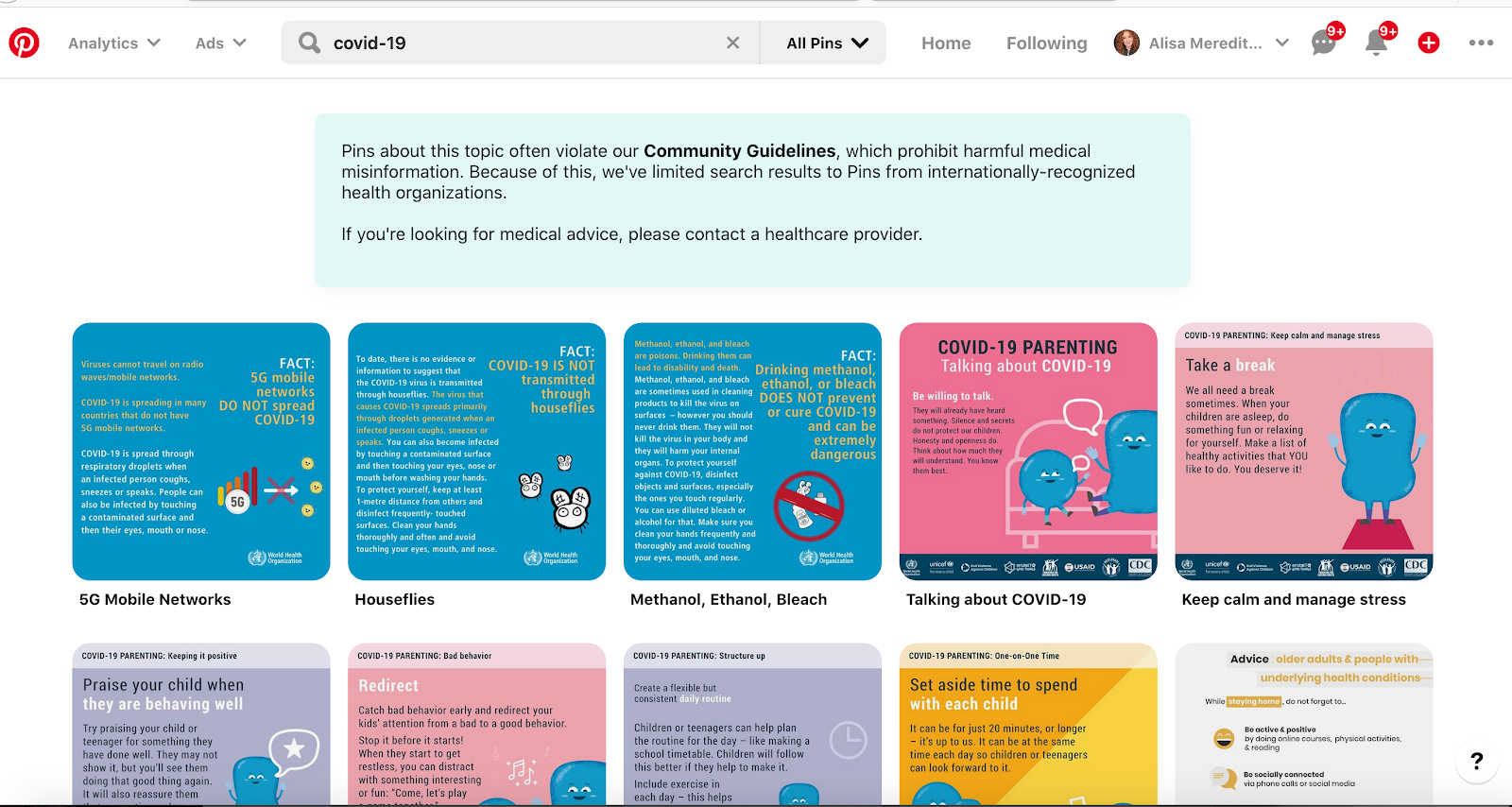
You’ll notice that none of the ideas above have anything to do with covid-19, coronavirus, pandemic, or virus. That’s because Pinterest is working hard to make sure people find accurate information on their site. If you search for anything related to COVID-19, you’re going to be redirected here:
So, don’t use any of those in the title, because you won’t get any reach and you may be reported for spam and risk losing your account for falling afoul of Pinterest community guidelines.
I am helping wedding photographers during this difficult time! If you need anything in a group setting, I have free information and trainings in my private Facebook group. I am also discounting my strategies sessions (normally $269 and now $49) so I can help as many people as possible!